 THE GAME ARCHIVE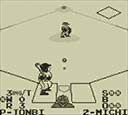
Picking Your League: USA vs. JPN Modes and Team Traits
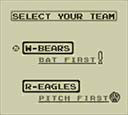
From the title screen, the game moves to a mode select screen where you choose USA MODE or JPN MODE, set BGM on or off, and confirm to reach team select. Only single play is available; the manual notes that 2 PLAYER cannot be played. The two modes also change part of the pitching screen display. Each mode then offers the same two teams, W-BEARS and R-EAGLES, and the batting order is fixed based on the chosen mode. Your mode pick therefore also sets the units: USA MODE uses mph, while JPN MODE uses km/h.
The mode choice changes player traits in both lineups. Under JPN MODE, pitchers throw slower and have less stamina, but breaking balls curve more easily, and there are more right-handed batters. Under USA MODE, pitchers throw faster and have more stamina, but breaking balls curve less easily, and there are more left-handed batters. The roster section lists player data for W-BEARS and R-EAGLES separately for each mode. So the same team names behave differently depending on whether you selected USA MODE or JPN MODE.
At the Plate: Swinging, Bunting, and Pinch Hitting
At the plate, the batter's actions are controlled by the D-pad and the A button. According to the manual's operation table on page 7, pressing A triggers a swing, while a short press of A followed by the D-pad executes a bunt. For pinch hitting, you select a substitute from the bench and press A during the TIME period. The D-pad also handles movement. These inputs form the core of batting, with the timing of the short press for bunts being distinct from a full swing.
Each batter in the game is defined by three attributes shown on page 26 of the manual: hit probability, bunt success rate, and batting stance. Hit probability is graded from A to E, where A indicates the highest likelihood of getting a hit. Bunt success rate is ranked A to C, with A making bunts more likely to succeed. The batting stance simply shows whether the batter stands left- or right-handed. These grades interact with the controls: a batter with an A in hit probability is more likely to reach base when you swing, while one with an A in bunt success rate is more reliable when you use the short-press bunt command.

On the Mound: Pitching Controls and Pitcher Attributes
According to the manual, pitcher actions are pace—move the pitch position with the D-pad and set it with the A button. After setting the pitch location, press A to pitch. Before pitching, Down reduces pitch speed with each press, and Up increases it. After the pitch, press a direction to throw a breaking ball that curves in that direction. The manual also lists pickoff moves: press B, then a base direction plus A. This sequence is documented separately from the pre-pitch speed changes and the mid-flight curve input, so speed and spin are handled at different moments.
Pitcher cards display stamina, pitch speed, and breaking-ball effectiveness, each rated A through C. Higher grades mean more stamina, faster pitches, and sharper curves. In TIME mode, pressing Select before the pitcher sets the pitch location pauses the game; pressing Select again shows the player lineup, enabling pinch hitters or pitcher substitutions. Choose a player and confirm with A, or press B to resume without a change. Whether you swap on the mound or leave the current pitcher in, the same lineup screen covers both roles.
In the Field: Catching, Throwing, and Fielder Behavior
Once a ball is caught, fielding control narrows to a single actor. The manual states that when someone catches the ball, you cannot control other players until a throw is made. The fielder holding the ball moves with the directional control, and after catching, throws are issued by selecting a base and pressing the throw button; an infielder may also throw while running. If a fielder holding the ball overlaps a runner, the result is a tag out. Infielders are placed automatically into base coverage on the field screen, and a fielder who has entered base coverage cannot be controlled, though the infielder who actually holds the ball can be.
The two fielding groups differ in throwing and range. Infielders are described as poor at long throws but having fast throw speed; outfielders are good at long throws but have slow throw speed. Catching uses the same movement control to move to the ball's position, so reaching a ball and then choosing a base to throw to are separate actions. Because infielders automatically cover bases, those players cannot be operated while covering, but the ball-holding infielder remains controllable. These rules shape routine fielding: infield arms are quick on shorter throws, while outfielders trade throw speed for long-distance ability.
On the Bases: Stealing and Runner Controls
Runner movement is handled through the field or pitching screens with two distinct button combinations. During a field screen, pressing the base-selection input together with the advance input sends the runner forward, while the same base-selection input combined with the return input brings a runner back toward the previous base. After a runner reaches the base ahead and begins sliding automatically, that runner cannot be returned to the prior base, so the decision to send or hold a runner must account for the slide threshold before the play develops fully.
A stolen base attempt is only valid when the pitcher has not yet begun the pitching motion. If the pitcher has entered that motion, the steal operation cannot be performed, and the attempt is invalid. Additionally, a steal taken after the batter receives a walk or is hit by a pitch is voided, and the runner is returned to the original base. The manual also notes that the steal input is the base-selection input plus the advance input while on the pitching screen, distinguishing it from the field-screen advance command.
Ending the Game: Innings, Cold Games, and the On-Screen Count
A standard game ends once 9 innings are complete; the outcome is shown and pressing a button returns to the title screen. If the score is tied, extra innings are played up to a maximum of 10 innings, so the game may close in a different inning than the usual ninth. Should the score remain tied even after that tenth inning, the result is a draw. Ball and strike information appears in an on-screen count using S for strikes, B for balls, and O for outs; in USA MODE these are displayed in the order B, S, O.
A 10-run lead activates the cold game rule: the game ends immediately and play does not proceed to the next inning. This documented condition works alongside the game-ending structure, so a lopsided score can terminate the match before the standard 9 innings or the 10-inning extra-inning limit is reached. If extra innings are needed, they extend to 10 innings, and if the score remains tied after that, the match is recorded as a draw rather than continuing further.
Sources & further reading.
- ベースボール — official game manual Retrieved Oct 15, 2026
First published .