 THE GAME ARCHIVE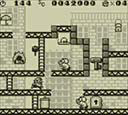
Mario's Core Moves: Run, Jump, Crouch, and Handstand
Movement in Donkey Kong for Game Boy begins with the directional input: pressing a direction makes Mario run that way, as detailed in the manual's action section. From this running state, you can jump by pressing the jump button, and crouch by pressing the crouch button. These three actions—movement, jump, and crouch—form the basic actions listed on manual page 7. The crouch action is also used to initiate a handstand: while crouching, press the jump button to stand on your hands. In a handstand, Mario can still move using the directional input, and he can kick away objects that fall from above, though the manual notes that some objects cannot be kicked.
A high jump is documented specifically for the handstand state: while standing on your hands, press the jump button to perform it. This action is distinct from the normal jump and is only available when inverted. Separately, the backflip is a running move: while moving, press the opposite direction of travel together with the jump button. This makes Mario leap backward in the reverse direction, and it can be used to reach higher places or grab ropes that are strung high. The manual lists this under advanced actions on page 25, alongside the handstand high jump, and notes that the backflip's benefit is reaching elevated areas or ropes.
Advanced Acrobatics: Backflips, High Jumps, and Rope Techniques
While Mario is running, pressing the direction opposite his current movement together with the jump button produces a backflip, a large jump that carries him backward relative to the direction he was traveling. The manual notes this action lets Mario move to high places and grab ropes strung overhead. Separately, Mario can enter a handstand by holding down and pressing jump; from that handstand, pressing jump again triggers a high jump, and pressing jump immediately after entering the handstand produces an even higher jump. During the handstand, left and right movement is possible, and Mario can kick away objects falling from above, though the manual cautions that some objects cannot be kicked away.
For ropes, the rules differ by orientation. Vertically strung ropes are grabbed automatically when Mario jumps near them; for ropes strung horizontally or diagonally, Mario grabs them by pressing the grab button at close range. While hanging on a rope, left and right movement is possible. Vertically strung ropes are climbed with the grab button, and holding two ropes at once makes the climb faster. Descending those same vertical ropes uses the crouch button, and holding only one rope makes the descent faster. Releasing the rope is done with the jump button.
Stage Structure: Ten Stages and Three Clear Conditions
The manual lists ten stages, each containing several faces, with stage names that include Big City, Forest, Jungle, Desert, Iceberg, Airplane, Rocky Mountain, and Tower. The final face of every stage is a fight against Donkey Kong and his group; clearing that encounter moves Mario onward to the next stage. Across these ten stages, the game sorts faces into three broad kinds, and each kind has its own clearing method. Stage 0 is the exception noted in the bonus-game rule, since it contains no bonus game.
The three face types differ in their clear conditions. On faces where Pauline appears at the top of the screen, the player avoids Donkey Kong's attacks and reaches the place where she is. On door faces, Pauline's screams come from a door with a keyhole, and carrying the key to that door opens it. On the final face of a stage, Mario attacks Donkey Kong by striking him with barrels and so on; defeating Donkey Kong clears the face. Collecting all three of the hat, bag, and umbrella in one face lets the player challenge a bonus game that can increase lives.
Tools of the Trade: Hammers, Super Hammers, and Collectibles
Choosing and using a hammer is straightforward but restrictive. According to the manual, picking one up makes Mario swing it automatically for a fixed period, attacking nearby enemies during that time. While he holds it, he cannot jump, so the hammer trades mobility for offense. The Super Hammer adds a second property: besides the hammer's attacking effect, it can break blocks. Both items follow a reappearance rule, since after a certain time passes from pickup, the hammer returns to its original position, ready to be taken again.
Three collectibles form a set: the hat, bag, and parasol. The manual states that if Mario collects all three of these items and then clears the stage, he can attempt a bonus game. These are distinct from the 1-Up heart, which simply increases the life count by one when taken. Other items on the same page behave differently: a trash can can be thrown at enemies or used as a stepping stone, though enemies that resemble trash cans also exist, and a jumping platform launches a high jump when stood on and the button is pressed with good timing.
Lives, Time Limits, and Continue Options
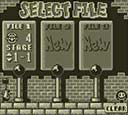
The in-play screen presents remaining time as an indicator that, when it runs out, produces a miss. A miss costs one life and restarts the current face from its beginning. Misses occur when touching an enemy (excluding some enemies), falling from a high place, running out of remaining time, or falling into a hole or touching a needle. The life counter can be increased up to a maximum of 99. When lives reach zero and another miss occurs, the game is over, and a menu appears offering CONTINUE, SAVE+END, or RECORD. CONTINUE resumes from the last face played or from a slightly earlier face when four lives remain. SAVE+END stores the four-life state and returns to the title screen, while RECORD displays records every four faces.
Time Trial governs how lives increase between stage sections. One stage is divided into groups of four faces. After clearing four faces, the total time from those cleared faces is displayed, and that total time determines how many lives are added. The faster each face is cleared, the more lives increase at the section break. Records of total time can be viewed by selecting RECORD on the pause screen or at game over, then choosing the stage to view. A record is saved automatically when a higher total time than previously recorded is achieved.
Time Trial Mode and Single-Player Structure
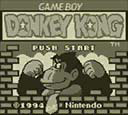
In Donkey Kong, the player controls Mario and advances through various faces in an action game, jumping and operating switches to reach the goal of rescuing Pauline, who has been kidnapped by Donkey Kong. The narrative describes Donkey Kong fleeing with the heroine Pauline while Mario pursues at the risk of danger. Early in the game, stages ported from the earlier Donkey Kong appear, while beyond them a new adventure world awaits Mario, the player: he travels from the big city by ship and across jungle, desert, and rocky mountains, aiming for Donkey Kong's birthplace to capture him and safely rescue Pauline.
In Time Trial, the faster each face is cleared, the more lives are gained at the face break. One stage is divided every four faces; clearing four faces displays the total time (the sum of the remaining time) from clearing each face, and lives increase according to that total time. To view records, choose "RECORD" on the pause screen or at game over, then select the stage you want to see. Records are saved automatically when a higher total time than previously recorded is achieved.
Sources & further reading.
- ドンキーコング — official game manual Retrieved Oct 15, 2026
First published .