 THE GAME ARCHIVE
Controls: Climbing, Sliding, Jumping, and Pausing
The Donkey Kong Jr. manual lists four basic controls on page 2. The directional input is documented as "Move/Climb up and slide down" for use on "vines or chains," so the same control covers horizontal travel, climbing upward, and sliding downward. The A button is assigned to "Jump." Beyond those two gameplay inputs, START handles "Confirm/Pause," and SELECT handles "Menu navigation." These assignments sit together under the "Basic Controls" heading, and no further button functions appear in the supplied text.
The documented rules interact through the surfaces named in the manual. Because the directional control is defined for vines or chains, climbing up and sliding down apply to those structures rather than to any stated alternate terrain. Jump is mapped to A as a separate action from the directional input. START carries a combined "Confirm/Pause" role, joining confirmations and pausing under one button, while SELECT is reserved for "Menu navigation." The manual does not describe any additional movement or jump behavior beyond these listed entries.
Starting a Game: Players and Difficulty
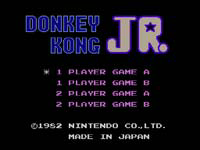
Donkey Kong Jr. begins on a setup screen rather than in the jungle. The manual's Getting Started section puts two choices there: the number of players and the difficulty, both selected with SELECT. Once those are set, START begins the game. The same SELECT button also handles menu navigation, so it is the only input used before play starts. Difficulty offers two levels, A and B, and the manual states plainly that B is more difficult. Nothing beyond player count and that A/B choice is configured on this screen.
The two documented difficulty levels, A and B, bracket the stage settings: A is the baseline, and B is described as more difficult, with no further detail given about what changes. Player count is set on the same screen before START commits the choice, so both the number of players and the A/B setting are locked in at that moment. SELECT drives the menu; START confirms and launches. The manual assigns these roles to the two buttons and stops there, so the Setup screen stays limited to player count and difficulty.
Key Collection and Stage Progression
In Donkey Kong Jr., the goal is to take control of Junior and bust Donkey Kong out of the cage. To do this, you must collect keys on stages one to three. The third stage marks the end of the key collection phase. During these stages, avoid losing a life by not coming into contact with an enemy, falling off a chain or a vine, or letting your bonus run out. When you lose all of your lives, it will be game over.
After collecting the keys on stages one to three, you then put them all in the keyholes on the fourth stage to open the cage and save your papa. So the game has a four-stage structure. Stages one through three are for collecting keys, and stage four is for using them in keyholes. Successfully placing all keys opens the cage, completing the objective.
Hazards and Losing Lives
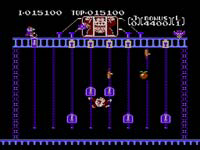
Junior loses a life under three documented conditions. First, if you come into contact with an enemy, a life is lost. Second, falling off a chain or a vine costs one life. Third, if your bonus runs out, you also lose one life. The bonus timer therefore functions as a hazard alongside enemies and falls. These three rules are the only life-loss conditions specified in the manual. Each is a distinct action or state: touching an enemy, dropping off a climbing surface, or letting the bonus counter expire.
Losing a life reduces your remaining total; when all lives are gone, the game ends. The manual states: "When you lose all of your lives it will be game over." There is no continue, checkpoint, or other recovery rule given for this section. The progression is direct: contact an enemy, fall from a chain or vine, or exhaust the bonus, and one life is removed. Repeat until zero lives remain, at which point game over occurs. No extra lives, 1-ups, or other replenishment mechanics are documented here.
On-Screen Display: Score, Lives, Keys, and Bonus
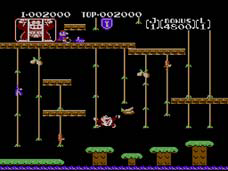
The on-screen display in Donkey Kong Jr. shows five distinct elements arranged as a status area. According to the manual, these are numbered as follows: Score, High score, Key, Remaining lives, and Bonus. The Score tracks the player's current points, while the High score records the best performance. The Key indicator reflects the key that Junior must collect, and Remaining lives shows how many attempts are left. The Bonus element is a timer that decreases as time runs out, creating urgency during each stage.
The Bonus timer directly influences scoring: as it decreases over time, the potential bonus awarded at stage end diminishes. This mechanic encourages swift play, as lingering reduces the final reward. The Remaining lives indicator connects to the hazard system: losing a life occurs when Junior is hit by an enemy or falls, and the display updates accordingly. The Key display tracks progress toward freeing Donkey Kong, with each collected key advancing the stage. Together, these elements provide real-time feedback on the player's performance and remaining opportunities.
Game and Platform Basics
Donkey Kong Jr. is the title of the game, and it is documented for the NES platform. The manual identifies the game as "Donkey Kong Jr." and lists "NES" as the platform. This establishes that the software belongs to the Nintendo Entertainment System catalog. The documented manual does not specify multiplayer modes, enemy types, power-ups, cooperative play, online features, save systems, currency, inventory, weather, vehicles, quests, or a manual publication date, so those areas remain outside the supported claims.
The platform field is supported as NES, and a separate critical claim confirms that the game was released for the NES. The evidence shows the title and platform together in a single record: "game_title": "Donkey Kong Jr." and "platforms": ["NES"]. No other platform is named in the supplied claims, and the manual does not describe multiplayer, cooperative, online, save, currency, inventory, weather, vehicle, or quest systems. The only concrete platform fact is the NES listing.
Sources & further reading.
- Donkey Kong Jr. — official game manual Retrieved Oct 15, 2026
First published .