 THE GAME ARCHIVE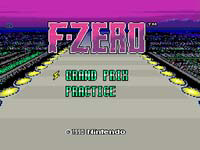
From the Manual: Basics of F-ZERO on Super Famicom
F-ZERO on the Super Famicom opens with a mode-selection screen documented on manual page 6. Using the d-pad, you choose between "GRAND PRIX" and "PRACTICE," then confirm with the button to begin. GRAND PRIX rotates through five courses, while PRACTICE lets you race any course you prefer. The same page notes that finishing a race adds "RECORDS" to the mode menu. Within GRAND PRIX, the league order runs KNIGHT then KING, and classes progress BEGINNER then EXPERT, each step increasing difficulty as stated in the manual's margin note.
The manual's page 6 instructions bind these options together: GRAND PRIX carries you across five courses in sequence, whereas PRACTICE isolates a single course of your choosing for repeated runs. Confirmation is a discrete step, so the chosen mode is locked in before the race starts. Completing any race triggers the appearance of "RECORDS" in the mode list, giving you a place to review your results. The league pair KNIGHT and KING, combined with the BEGINNER and EXPERT classes, define the escalating structure the manual explicitly describes for GRAND PRIX play.
Taking the Wheel: Steering, Tilt, and Speed Control
On the basic controls screen, steering is assigned to the handle, which in this version maps to the left stick. Pushing left or right shifts the machine's weight in that direction, giving you a separate way to lean the craft beyond turning the wheel itself. Acceleration sits on the B button, and the C button applies the brake to slow the machine down. These inputs are listed together under basic operations, so the same screen covers forward speed, slowing, and the two weight-shift directions.
The two weight-shift directions are distinct from the handle: left tilt moves the machine's balance left, and right tilt moves it right. Because weight shift is its own binding, leaning can be combined with a turn rather than replacing it. Speed, meanwhile, is handled by the accelerator and brake alone; the manual assigns no other control to it. This keeps the layout symmetrical, with one handle for steering, two directions for weight movement, and two buttons for going faster or slower.
Super Jet: Charging Up for a Burst of Speed
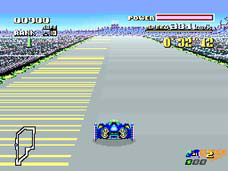
The Super Jet is bound to the A button, sharing the controller layout with the handle for steering, the accelerator, the brake, and the left and right weight-shift inputs, plus pause. Its availability is tracked by an on-screen indicator at the lower right of the display. Each completed lap of the course lights that Super Jet display green, and it can hold up to three lit segments at once, so the count is tied directly to laps run rather than to any other action.
While the gauge is lit, pressing A triggers a Super Jet, letting the machine run faster for a short time. Because lamps accumulate one per lap and cap at three, the boost is available only as long as at least one segment remains lit, and each press draws on that stock. The two documented rules therefore interlock: laps completed add up to three green lights, and an A-button press converts a lit light into a brief burst of speed, with the indicator itself showing whether any Super Jet charge is currently available.
The Power Meter and the Perils of Contact
During a five-lap race, the power meter drains whenever your machine touches another machine or either of the left and right guard beams. The manual on page 8 states that touching other machines or the guard beams reduces the power meter, and when it reaches zero, the result is retirement. No other depletion source is documented, so the meter measures contact damage. Because every rival machine and both side barriers can reduce it, clean driving preserves the meter while repeated scrapes shorten the race. This makes the meter the resource that determines whether you finish at all.
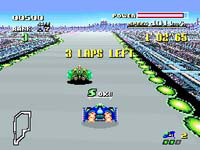
The documented rule sets a hard end: power meter at zero produces retirement, directly ending the run. In GRAND PRIX, a second, separate retirement condition exists: you must pass each lap within a fixed position and finish in third place or higher, or you retire. The screen's upper-left SAFE indicator shows the position required for the current lap. These rules interact, since contact damage and lap-position requirements both threaten the same race outcome, and the SAFE display tells you the standing each lap demands.
Grand Prix Rules: Leagues, Classes, and Lap-by-Lap Pressure
The manual's start-up screen offers GRAND PRIX, described as racing across five courses, and PRACTICE, where you pick a course to practice on. Racing a course to completion in either mode adds RECORDS to the menu, which opens a record list. Inside GRAND PRIX, the league order runs from KNIGHT to KING, while the class order runs from BEGINNER to EXPERT; both sequences are listed as increasing in difficulty. The manual places no other conditions on entering these leagues and classes.
Races run five laps, competing for position against the other machines. Touching another machine or either side's guard beam drains the power meter, and reaching zero retires you. Grand Prix layers a second rule on top: on each lap you must pass at a set rank, and you must finish inside the top three or you retire. The SAFE marker in the screen's upper-left corner shows the rank required for that lap, so the passing place can be read while driving.
Spare Machines and Saving Your Progress
In GRAND PRIX, retiring from a race does not immediately end the run if spare machines remain. The manual states that when you retire, you can select "TRY AGAIN" to re-enter the race; this consumes one spare machine and returns you to the race start. If no spare machines are left, the game is over. The number of spare machines can increase: certain points earned during a race add to your stock, giving you more chances to continue.
F-ZERO uses an auto-save system: when a race finishes, data is automatically saved. RECORDS mode becomes available after you complete a race, appearing on the mode select screen. While viewing RECORDS, pressing a button displays an "ERASE? YES NO" prompt; choosing "YES" deletes the course data currently shown. The manual warns that erased data cannot be recovered, so deletion is permanent.
Sources & further reading.
- F-ZERO — official game manual Retrieved Oct 15, 2026
First published .