 THE GAME ARCHIVE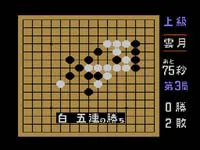
Five in a Row: The Core Match Loop
Play in this Famicom board game begins with the first player using black stones and the second player answering with white stones, each side placing one stone per turn. A player wins by arranging five stones in a line along a column, row, or diagonal. After six games are played in succession, the game ends and the final result is decided; if a draw occurs, that game is replayed. Because black moves first, black also carries specific forbidden-move restrictions, so black cannot play freely in every position.
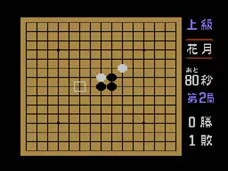
The play screen shows five pieces of information during a match: difficulty level, the starting stone pattern, time remaining for the advanced level, the current game number, and the win-loss record. The round indicator tracks progress through the six-game set, while the starting pattern and difficulty setting establish the conditions for that board. Time remaining appears only for the advanced setting. Together these display elements let you see which game is in progress and how the match stands before the final outcome is reached.
Black's Forbidden Moves and Instant Losses
Black's forbidden moves in this game are unblocked three, three-three, unblocked four, four-four, and overline. Playing any of these moves results in an immediate loss at that point. Unblocked three is a three-stone line with both ends open. Three-three occurs when a single move creates two or more such unblocked threes at once. Unblocked four is a four-stone line with at least one open end, and four-four means one move simultaneously forms two or more of these fours. Overline is a line of six or more stones arranged in a column, row, or diagonal.
Because black moves first, black carries these specific forbidden-move restrictions and cannot play freely in every position. If black places a stone that creates one of these configurations, the loss is applied at that moment. In the six-game match, black must avoid single placements that would produce two unblocked threes, two fours, or an unbroken run of six or more stones, while white is not bound by the same restrictions. The basic win condition remains arranging five stones in a row.
Beginner, Intermediate, Advanced, and Two-Player Modes
From the title screen, a player moves through the available choices with the directional control and confirms a selection with the button to begin that game. The listed choices are Beginner, Intermediate, Advanced, and a two-player game. Beginner mode marks a stone that needs attention by making it blink, so that cue is present on the board. Intermediate mode removes that blink even when a stone still needs attention. Advanced mode adds a separate element: an allotted time limit, and running out of that time results in a loss. The two-player game lets two people play against each other.
The four choices therefore differ in what they show or enforce during a match. Beginner blinks the stone to address, Intermediate keeps that stone unmarked, and Advanced imposes a time limit whose expiry counts as a defeat, so running out of allotted time ends the match as a loss. The two-player game is played by two people. Start selection stays the same across them: choose the desired game and press the button to start. The play screen also shows the difficulty level, the starting stone pattern, the time remaining for the advanced level, the current game number, and the win-loss record.
Controls, Resignation, and Terminology
Once a board is underway, the cursor is moved with the directional control, and the same input confirms a highlighted option during menu selection. Placing a stone is done with one button, while game pause and item confirmation share a separate button, and item selection uses its own. At any point during a match you can resign by pressing the designated resign button, ending the contest in acknowledgment of defeat rather than continuing to fill the board. A home button menu sits outside these in-game inputs, and choosing the two-player option requires two controllers rather than one.
The manual's terminology section defines the vocabulary used around the board. An unblocked three is a three-stone sequence whose two ends are not stopped, an unblocked four is a four-stone line either with a gap or with one end stopped, and the starting stone pattern refers to the placement arrangement up to the third move, where each named pattern carries its own name. A sequence describes stones lined up vertically, horizontally, or diagonally, and resignation means one side admits defeat to end the contest.
Controller and Button Assignment Setup
Before choosing a match type, you can set up the controller through the home button menu by picking the controller settings option, which displays the registered controller and offers a register choice that follows on-screen guidance. On the basic control chart, moving the cursor, placing a stone, resigning, pausing the game or confirming an item, selecting an item, and opening the home button menu each map to separate inputs. Button assignments live on their own screen: selecting a button on the left shows its current mapping, and choosing change assignment brings up the controller's buttons on the right so you can pick a different one. Confirming saves the change, and assignments are stored per game; two controllers are required to play the two-player option. Supported controllers include the Wii U GamePad, Wii U Pro Controller, Wii Remote, and Wii Remote with Classic Controller Pro, with Wii Remote Plus and the standard Classic Controller also usable as substitutes.
On the board itself the mapping stays fixed unless reassigned: the directional control moves the cursor, one button places a stone, another resigns, another pauses the game or confirms an item, another selects an item, and the home button opens the home button menu. Because these are distinct inputs, resignation ends the contest as an acknowledgment of defeat rather than continuing to fill the board, while the pause item and the stone-placing action do not share a button. The renameable assignment screen only changes which physical button performs each job, and that saved layout carries over to subsequent sessions.
Sources & further reading.
- 五目ならべ 連珠 — official game manual Retrieved Oct 16, 2026
First published .