 THE GAME ARCHIVE
Boot Up and Core Controls
The manual's Controls section on page 2 opens with five entries that map every button before any movement detail appears. Move and Menu navigation share the directional control. Jump and Confirm are both assigned to A. Inhale and Use copied ability occupy B, while START serves two roles: Start game and View game help screen. SELECT alone is listed for Discard copied ability. These pairings mean the same button changes function by context, and the help screen is one START press away while a copied ability can be thrown away with SELECT.
Under the same page's Other list, specific press rules build on those buttons. Walk uses the directional control; double tap and then hold it to run, and letting go stops running. Pressing the opposite direction while running skids to a halt. Crouch is hold down on the directional control. Press A to jump, or press it while running to jump even further. Press B to inhale an enemy or object. In front of a doorway, pressing up enters it. Each rule pairs one button action with an exact condition.
Running, Skidding, and Jumping
Movement on the ground starts with a walk using the left direction control. To run, double tap that same direction and then hold it; letting go stops the running state and returns Kirby to a walk. While running, pressing the direction control in the opposite direction makes Kirby skid to a halt rather than continuing forward. Because running is a held state rather than a toggled mode, releasing the input is the documented way to stop, while an opposing press during a run produces the skid animation and brings motion to a stop.
Jumping uses the A button, and the documented distance depends on whether Kirby is running when A is pressed. Pressing A while running makes Kirby jump even further than a jump from a standing or walking state. The run input and the jump input therefore combine: the double-tap-and-hold direction control establishes the running state, and pressing A during that state converts the jump into the longer-running jump. There is no separate run-jump button; the manual lists Jump as A and describes the longer jump as a property of pressing A while running.
Crouch, Slide, and Ladders
Crouch is performed by pressing and holding down on the D-pad, as documented in the manual's basic controls. From this crouched position, pressing either A or B executes a slide attack. The same manual lists A as jump and confirm, while B is inhale or use copied ability, so the slide action reuses those buttons but only triggers while crouching. Separately, ladders are handled with a different input: when next to a ladder, press up on the D-pad to ascend or descend it. Doorways also use up: press up in front of a doorway to enter it. These three actions—crouch, slide attack, and ladder or doorway use—form a distinct set of movement and interaction options controlled by holding down or pressing up in specific contexts.
The rule interactions are straightforward: holding down produces a crouch, and while crouched, A or B becomes a slide attack instead of jumping or inhaling. Ladders and doorways share the up direction, but the game distinguishes them by proximity. Pressing up next to a ladder ascends or descends it, while pressing up in front of a doorway enters it. The manual does not assign separate buttons for these actions, so the same directional input covers both depending on what Kirby is facing. This means the player must position Kirby correctly—near a ladder or directly in front of a doorway—for the up press to trigger the intended transition. The slide attack remains tied to crouching and does not overlap with ladder or doorway use.
Copy Abilities: Inhale, Exhale, Swallow
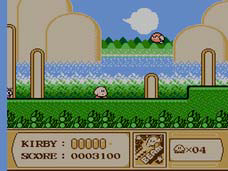
Kirby starts with one action for foes and objects: press B to inhale. The manual groups this with using a copied ability under the same input, so B is the button for the initial suck and for whatever power Kirby currently holds. Inhaling pulls in an enemy, block or star. That loaded state then opens two different follow-ups: exhale it as a star, or swallow it. There is no throw button; the decision happens after the object is already inside Kirby.
Press B after inhaling an enemy, block or star to fire out a star, which the manual notes can destroy enemies or blocks. Press the down direction to swallow an inhaled enemy and copy their ability. Different enemies have different abilities, or some have none at all. Once a copied ability is held, B also uses it, per the basic controls. SELECT discards a copied ability, freeing B to return to plain inhaling.
Airborne and Underwater Actions
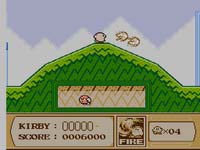
Airborne movement relies on two documented inputs. Tap A repeatedly while in the air to float, which suspends Kirby above the ground. Press B while in the air to fire out an air pellet; the manual states that doing this will cause Kirby to deflate and he will come back down to the ground with a thud. Float and mid-air attack therefore work against each other: floating keeps Kirby aloft, while the air pellet trades altitude for an offensive shot. A third airborne action is Inflate, which requires pressing to inflate, and then again to rise into the air, giving Kirby another way to gain height.
Underwater actions are separate from the mid-air set. Press A + while underwater to swim, using the jump button and a directional input together. Press B while underwater to squirt water and take down enemies, a water gun attack that works below the surface. So while mid-air B makes Kirby drop with a thud after an air pellet, underwater B instead fires water. Inflate likewise uses to inflate, and then again to rise into the air, but that action is described for air, not for swimming. Each environment therefore has its own B-button result and its own movement rule.
Map Progression, Bosses, and Items
On the map screen, numerous doors lead to the individual stages of that level. Clearing a stage expands the map screen so it grows larger and reveals new doors to enter through. The stage screen itself ends with a boss lying in wait on the final stage of each level; defeat that boss and grab the Star Rod piece to proceed on to the next level. The manual states you must defeat all eight bosses to clear the game, so each level's boss plus its Star Rod piece is the required step forward.
Four items are listed on the manual's items page. The Maxim Tomato fully restores your health meter, while Candy makes you invincible for a short time. The 1UP grants you an extra life, and the Warp Star transports you to a different location. These pickups interact with the documented progress rules: taking hits depletes your health meter, so the Maxim Tomato refills it; Candy's temporary invincibility and the 1UP's extra life both offset that same depletion risk. The 1UP is not listed as a health restoration; the manual only says it grants an extra life.
Sources & further reading.
- Kirby’s Adventure — official game manual Retrieved Oct 16, 2026
First published .