 THE GAME ARCHIVE
Basic Controls: Walk, Dash, and Enter Doors
Kirby's on-foot movement in this section comes down to directional presses and one contextual button. Walking requires holding left or right. Dashing is the same left or right direction pressed twice consecutively, so a double-tap along the horizontal axis triggers the faster state. When Kirby stands in front of a door, pressing up enters it. Crouching uses down while on the floor, and down also drops Kirby through specific floors that permit it. Pushing down together with jump performs a slide, which reuses the jump button inside a grounded directional input rather than a separate action button.
Jumping and flight share a single button at two different moments. Pressing the jump button makes Kirby jump; pressing it again while airborne makes him fly. Once flying, the attack button produces an air bullet, an action listed separately from ground attacks and copy-ability use. Door entry is gated by position and vertical input: up only enters a door when Kirby is in front of it. Similarly, the drop-through-floor action requires standing on a specific type of floor, so down does not always leave the ground. These contextual conditions keep one button or direction doing different jobs depending on Kirby's location and state.
Inhale, Spit, and Copy Abilities
Kirby's basic intake begins by pressing the suck button while near an enemy. Once an enemy is inside Kirby, the manual gives two separate follow-up inputs: pressing down or the A button swallows it, while pressing the suck button again spits it back out. Swallowing a foe that has a special skill converts that skill into a Copy Ability. The same suck button also serves as the attack input, and while Kirby is flying it fires an air bullet instead. To use a copied ability, press the suck button again during the copy state.
Copy Abilities are not only for attacking enemies. The manual states that some stage blocks cannot be broken unless a specific Copy Ability is used, and it tells the player to look at the mark drawn on the block as a hint. To remove a current ability, press the Copy Ability cancel button; canceling turns the ability into a star. Kirby can suck in and swallow that star to copy the same ability again. The manual also notes that when Kirby fuses with a companion, the moves he can perform change.
Six Animal Companions and Fusion Powers
In Kirby's Dream Land 3, you can press a button in front of a companion to merge with them, as detailed on page 14 of the manual. Six companions appear in stages alongside Gooey, and each grants a distinct ability while merged. Rick does not slip on ice, Kine moves smoothly in water, Coo flies against wind, Nago can triple jump, ChuChu sticks to and moves along ceilings, and Pitch's power varies with the copy ability. These abilities allow traversal through ice, water, wind, ceilings, and vertical spaces, respectively.
While merged, the companion's ability changes based on the copy ability Kirby currently holds. The manual states that the combination of the companion and copy ability alters the merged abilities. For example, Pitch's power depends on the copy ability, as noted in the companion list. This means that different pairings yield different results, and you can experiment by merging with different companions while holding various copy abilities. The six companions each have a base ability, but fusion with copy abilities expands the range of actions available.
Level Structure and Heart Stars
From the world map screen, pick a level (LEVEL), then choose a stage on that level's map to start play. Each level holds six stages, and clearing the last one means defeating a boss, which opens the next level. The level map marks four things: stages, stages where a Heart Star was already earned, the route back to the world map screen, and the boss. Each level's boss is controlled by an evil cloud, so before fighting, you should obtain the Heart Star in every stage of that level and then win to return the boss to its senses.
Every stage contains one person in trouble. Meet that stage's particular condition and help them, and you receive a Heart Star at the goal. Conditions differ from stage to stage. While moving through a stage, cooperate with Gooey and the animal companions to advance; losing all health or falling into a hole counts as a miss and reduces Kirby's remaining count, and a miss while that count reads 00 ends the game. The level map tracks stages where a Heart Star was taken, so the six-stage run and its Heart Star state stay visible.
Items, Star Fragments, and the Goal Game
Page 15's item list names several tools Kirby can pick up. The Maxim Tomato restores Kirby's health to maximum, while the Genki Drink restores one unit of health. The Invincibility Candy grants temporary invincibility, and the 1UP directly adds one to Kirby's remaining count. Star Fragments work differently: collecting 30 of them increases Kirby's remaining count by one. Rounding out the list is the Warp Star, which moves Kirby to another level. Each entry maps a distinct pickup to a specific effect on health, temporary protection, or remaining lives.
Page 16 describes the Goal Game, which begins once a stage is cleared. Kirby stretches and contracts, so the manual says to press at the right timing to make him jump. Where he lands decides the item: jumping while crouched sends him farther, and jumping while stretched sends him nearer. The landed position then yields the item sitting there. So clearing a stage feeds directly into a timing-based jump, and the crouch-versus-stretch state at the moment of the press sets the distance, which in turn determines which item Kirby obtains.
Gooey Co-op and HUD Basics
On a stage, pressing the button shown on manual page 12 makes Kirby's friend Gooey appear. In single-player mode Gooey is controlled automatically by the computer, and repeatedly tapping the button makes him disappear. Pressing that button on a second controller lets player two take control of Gooey at any time; if Gooey is absent and player two presses it, Gooey appears, and repeated taps dismiss him. Player two's Gooey uses the same basic controls as Kirby, but can inhale only one enemy or block at a time. If Gooey drifts away from Kirby and vanishes off-screen, he returns automatically to Kirby's vicinity. Having Gooey present slightly reduces Kirby's health, while inhaling and swallowing Gooey restores some of Kirby's health.
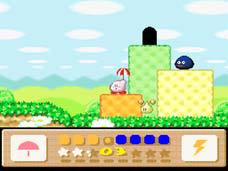
The on-screen display described on manual page 10 numbers nine elements: the door, Gooey (controlled by the computer or player two), Kirby, Kirby's active copy ability, Gooey's active copy ability, collected star pieces, the Kirby and Gooey health bars, the boss health display, and Kirby's remaining count. The health bars are color-coded: yellow for Kirby, blue for Gooey. The boss health display appears when fighting bosses and similar opponents. Copy ability marks are also shown in this display, with Burning, Ice, and Clean given as examples.
Sources & further reading.
- 星のカービィ3 — official game manual Retrieved Oct 15, 2026
First published .