 THE GAME ARCHIVE
Metroid asks you to think about where a new ability can take you. Nintendo released the original in Japan on August 6, 1986, for the Famicom Disk System. Its description connects learning new actions with reaching new passages, while the NES manual explains how hidden items unlock previously inaccessible areas. That relationship between equipment and exploration is the focus of this introduction: what Samus does, how her tools change the journey, and which rules a newcomer needs to understand. The control and password details below refer specifically to the NES edition.
The premise: Samus, Zebes and Mother Brain
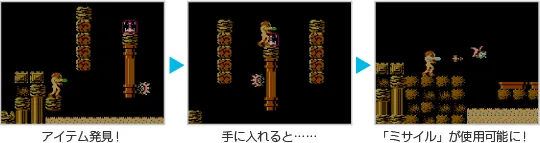
You control Samus Aran, described in Nintendo's own material as a space warrior, on the fortress planet Zebes. The objective is to infiltrate the planet and destroy Mother Brain. Nintendo's Japanese summary also stresses reinforcing the power of the suit and weapons, and the manual frames the whole journey as a search: you fight through each area while looking for items hidden throughout Zebes that power you up. Some of those items grant new abilities or attacks, and those abilities then open entry to areas that were previously inaccessible.
The core loop: explore, find an item, open a new route
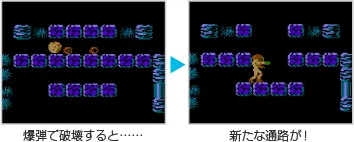
The manual describes an intertwining of exploration and power. You search the areas of Zebes, and the items hidden across the planet change what you can do. A new ability is not simply a bigger number: it is a key that unlocks space. That is exactly what Nintendo's Japanese summary means when it says new actions become usable and new passages become traversable. The practical consequence for the player is a habit of reading the environment as a set of locked routes, and treating each new item as a possible answer to an obstacle already seen but not yet passable.
Controls and the two-button foundation
For the NES edition, A jumps and B attacks or sets a bomb. START pauses or confirms, while SELECT switches missiles or navigates menus. Movement, transforming into the Morph Ball and aiming upward share the directional control. The important distinction is between an action and the equipment that makes it possible: the Bombs item, for example, is what enables bomb placement while rolled into a ball. Learning the buttons is only the beginning; finding abilities expands what those buttons can do.
 View full image ↗
Morph Ball, bombs and the shape of a route
The Morph Ball lets Samus roll into a compact shape and investigate tight spaces. Bombs add a separate action to that form: once the item is acquired, B sets a bomb while she is rolled up. These are two different abilities, so acquiring the Morph Ball should not be confused with already having Bombs. Read the item descriptions as changes to your available actions. Small passages make the compact form relevant, while the bomb command belongs to that form rather than to ordinary upright shooting.
Beams: extending, freezing and bending
The Long Beam extends the reach of the beam weapon. The Ice Beam temporarily freezes enemies so they cannot move. The Wave Beam sends the shot in a wave pattern. These descriptions explain different effects, rather than merely presenting a ladder of larger damage numbers. For a newcomer, the useful question is what a pickup changes about the basic attack: its reach, the movement of a target, or the path of the shot. This introduction describes those documented effects without assuming every beam is available at once.
Missiles and the gates that answer them
The Missile item, as described in the manual, lets you launch powerful missiles, switched to with SELECT and fired with B, and it increases your maximum number of missiles by five. The manual then documents gate colours with specific rules: blue gates open with one blast from your beam, red gates open if you hit them with five missiles, and for some gates ten missiles are needed instead of five. This is the clearest statement of the game's design language. A visible barrier corresponds to a known resource cost, so the player learns to budget missiles against the route ahead rather than spending them freely.
 View full image ↗
Energy tanks and what running out means
Enemy contact, enemy attacks and certain hazards consume energy. Nintendo's manual describes the energy display alongside the additional reserves provided by energy tanks: exhausting energy and all remaining reserves leads to game over. Energy Balls restore part of the energy supply, while an Energy Tank pickup replenishes energy and adds another tank. That makes recovery items and capacity upgrades worth distinguishing. Both affect survival, but one restores part of the existing supply and the other expands the reserve available for the journey.
Movement and protection upgrades
High Jump increases how high Samus can jump. Varia reduces damage from enemy attacks by half, according to the manual. The two upgrades solve different problems: one changes movement capability, while the other changes the cost of taking a hit. This is another way to read the game's equipment system. A pickup may affect the routes you can reach, the attacks you can use, or how much punishment you can survive; its value is not limited to the weapon currently firing.
Password continuation in the NES edition
The NES edition uses passwords to continue an adventure after game over, preserving progress and abilities as described in its manual. On the password-entry screen, the directional control navigates, A enters a character, B moves the cursor backwards to correct a mistake, and START submits the completed password. Record the password carefully if you intend to use this continuation method. These instructions apply to the NES edition covered by that manual; they are not instructions for the Japanese Famicom Disk System release.
What a new player should understand first
- Begin by understanding the relationship between an obstacle and an ability. The manual explicitly connects hidden upgrades with access to new areas. Next, distinguish ordinary shots from missiles: blue gates and red gates have different opening rules. Keep recovery and capacity separate in your thinking, too, because Energy Balls and Energy Tanks serve different purposes. Finally, check the edition before applying a control or continuation instruction. These principles give the documented systems a useful shape without prescribing an unsupported route through individual rooms.
Scroll sideways to see the full table →
| Item | Documented effect |
|---|---|
| Morph Ball | Roll into a ball for tight spaces |
| Bombs | Set bombs in ball form |
| Energy Ball | Restores energy |
| Energy Tank | Replenishes energy and adds a tank |
| Missile | Launches missiles and increases missile count |
| High Jump | Allows higher jumps |
| Varia | Halves enemy attack damage |
| Long Beam | Extends beam length |
| Ice Beam | Freezes enemies |
| Wave Beam | Beam travels in a wave pattern |
Scroll sideways to see the full table →
| Gate colour | Documented opening requirement |
|---|---|
| Blue | One blast from your beam |
| Red | Five missiles |
| Some gates | Ten missiles instead of five |
Scroll sideways to see the full table →
| Input | NES-edition function |
|---|---|
| Directional control | Move / Morph Ball / Aim upwards |
| A | Jump |
| B | Attack / Set bomb |
| START | Pause / Confirm |
| SELECT | Select missiles / Menu navigation |
Japanese release of Metroid on the Famicom Disk System.
Source ↗
Sources & further reading.
- Nintendo: VC Metroid Retrieved Oct 6, 2026
- Nintendo: Iwata Asks, Metroid Other M — original-game discussion Retrieved Oct 6, 2026
- Nintendo Classic Mini: Metroid Retrieved Oct 6, 2026
- Metroid — Nintendo NES edition electronic manual Retrieved Oct 8, 2026
First published .