 THE GAME ARCHIVE
Basic Controls: Move, Morph Ball, and Aim Upwards
Metroid on the NES provides a basic control scheme documented in the official manual: the directional pad handles Move/Morph Ball/Aim upwards, the A button performs a Jump, the B button is for Attack/Set bomb, START is used to Pause/Confirm, and SELECT selects missiles or navigates menus. These assignments are fixed, with no customization mentioned. For basic movement, pressing a direction on the D-pad moves Samus left or right when on the ground. The same D-pad also controls Morph Ball and Aim upwards functions, though the manual does not detail how these actions are triggered, such as whether holding down or pressing another button is required. Jumping is executed with the A button, allowing Samus to leap over obstacles or reach higher platforms. Each input corresponds to a specific action, and the layout separates movement, jumping, attacking, pausing, and menu navigation across the controller.
The D-pad's Move/Morph Ball/Aim upwards grouping means that directional input serves multiple purposes depending on context. In standard movement, pressing left or right moves Samus horizontally. The Morph Ball function allows Samus to roll into a compact form, but the manual does not specify the exact input sequence—likely a down press while stationary, though this is not confirmed. Aim upwards enables shooting at higher angles; again, the precise trigger is not detailed beyond the D-pad association. These actions are not simultaneous with jumping or attacking. The A button exclusively handles Jump, while B handles Attack/Set bomb. START pauses or confirms, and SELECT manages missile selection or menu navigation. This separation ensures that each button has a dedicated role, but the manual leaves some ambiguity about how the D-pad's three functions are differentiated during play.
Attack, Bomb, Pause, and Missile Selection
The NES controller's B button serves two documented functions. In the basic, standing state it triggers Samus's standard attack. Once the Morph Ball item has been collected and Samus has rolled into a ball, that same B button instead sets a bomb, as the manual specifies: "This item allows you to set bombs with B when you are rolled up into a ball." The A button handles jumping, while movement, morphing, and aiming upwards share the directional control. START pauses the game and doubles as the confirm input, so the same button both halts play and validates menu selections. SELECT has its own task: selecting missiles and navigating menus.
Missiles depend on two separate inputs working together. After the Missile item has been acquired, SELECT switches the active weapon, and B then fires the missile rather than the normal shot. The manual states that pressing SELECT switches your weapon and B fires off a missile. Ammo is governed by the Missiles (Ammo) pickup, which "Replenishes the amount of missiles in your stock by two." Collecting the Missile item itself also "Increases your maximum number of missiles by five," so the weapon and its ammunition capacity are raised by different item types.
Mission: Infiltrate Zebes and Find Power-Up Items
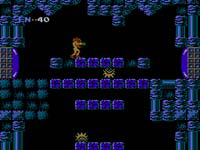
In Metroid, the player controls Samus with the objective to infiltrate the fortress planet Zebes and destroy Mother Brain. The manual describes using all special abilities to fight through each area while searching for hidden items. These items, scattered throughout Zebes, power up Samus. Some grant new abilities or attacks that allow entry into areas previously inaccessible. The gameplay thus revolves around exploration, combat, and item collection to progress toward the final goal.
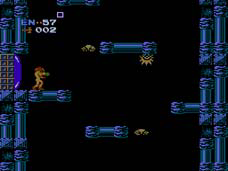
Progression through Zebes is often blocked by gates, which require specific conditions to open. Blue gates open with one blast from your beam, while red gates open if hit with five missiles; some gates require ten missiles instead. Finding items like the High Jump boots, which let you jump higher than before, can help reach new areas. These mechanics interlock: acquiring items may provide the means to bypass gates, enabling further exploration and access to additional power-ups.
Gate Colors: Blue Beams, Red Missiles, and Ten-Missile Gates
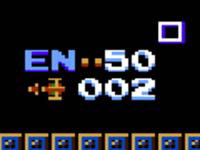
The manual's page 5 gate diagram identifies the HUD elements that matter when you reach a barrier: the Gate itself, Samus, the Energy Tank, remaining energy, and remaining missiles. The same page then splits gates into two colors. Blue gates open with one blast from your beam, so a single beam shot clears them. Red gates are tougher: they open if you hit them with five missiles. Because missiles are a limited resource counted in the HUD's remaining-missiles field, spending five on a red gate is a visible cost, not a free action like a beam shot. The colored barrier is the interaction; the manual gives no timing, aiming, or alternate route for it.
A footnote under the gate color list states that for some gates ten missiles are needed instead of five. So within red gates, the manual documents two missile costs: the standard five-missile red gate and the tougher ten-missile gate. Both consume missiles from the same remaining-missiles counter shown in the HUD, and unlike blue gates neither responds to a beam blast. The documented rule is therefore a three-tier gate system: one beam blast for blue, five missiles for standard red, ten missiles for the tougher red variant. The manual does not say which specific gates use ten, nor how many of each type exist.
Energy, Damage, and Energy Tanks
Energy in Metroid is consumed whenever Samus is hit by an enemy, struck by an enemy attack, or fails to avoid certain hazards. According to the manual, any of these events causes damage and consumes a portion of the energy reserve. This energy pool is the resource that absorbs hits during normal play, and it is tracked separately from the expendable tanks described later. The rule is direct: damage drains energy, and as long as some energy remains, Samus continues without consuming a tank. The manual does not list specific enemy types, damage values, or hazards, so the exact portion lost per hit is not documented in this section.
When energy reaches zero, one energy tank is consumed; if all energy is lost and no tanks remain, the game is over. Energy Tanks are also items found during the mission: collecting one replenishes energy and grants an additional tank. A separate item, the Energy Ball, restores only a portion of energy without adding a tank. The manual notes that additional energy tanks appear as the mission progresses, tying survival to item collection found across Zebes rather than to any menu-based refill.
Weapons and Items: Morph Ball, Bombs, Beams, and Password Saves
The Morph Ball item rolls Samus into a ball by pressing the down control, enabling investigation of tight spaces. Once rolled up, the Bombs item lets you set bombs with the B button. The manual also lists the Screw Attack: while holding the jump control, press A to perform a screw attack, damaging enemies on contact. For beam weapons, the Long Beam extends your beam's length, the Ice Beam temporarily freezes enemies solid so they can't move, and the Wave Beam travels in a wave pattern.
When your game ends, Metroid provides a password that allows you to continue your old game with your progress and abilities intact. On the password-entry screen, use the directional control to move around and the A button to enter a character. If you make a mistake, press B to move the cursor backwards. Once the password is ready, press START to enter it. The manual notes that the Missile item lets you launch powerful missiles: press SELECT to switch your weapon and B to fire off a missile, and each Missile item increases your maximum missile count by five.
Sources & further reading.
- Metroid — official game manual Retrieved Oct 16, 2026
First published .