 THE GAME ARCHIVE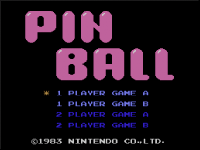
Flipper and Launch Controls
The basic control scheme splits flipper duties between the sides of the controller. The left flipper is assigned to the left input, while the right flipper and the ball launch share a single command on the right side. This means the same press that operates the right flipper also sends the ball into play. The game supports several controllers, including the Wii U GamePad, Wii U Pro Controller, Wii Remote, Wii Remote with Classic Controller Pro, and alternatives such as the Wii Remote Plus or Classic Controller. For a two-player game, two controllers are required, and only one Wii U GamePad can be connected.
Once the ball is launched, the goal is to keep it from falling off the screen, using the left and right flippers to hit it back and pursue a high score. The pinball table spans two screens, and losing the ball on the lower screen counts as a miss. Each miss decreases the remaining ball count, and when no balls remain, the game ends. This loop connects the flipper controls to the table layout: the launch sends the ball up, flippers keep it alive, and the lower screen is the fail zone that costs one ball.
Modes, Difficulty, and Setup
Before starting a session, the manual describes registering a controller with the console through the HOME Button menu. Open the HOME Button menu, choose the controller settings entry, then select the registration option and follow the on-screen instructions. The supported controllers are the Wii U GamePad, the Wii U Pro Controller, the Wii Remote, and the Wii Remote paired with a Classic Controller Pro. A Wii Remote Plus can stand in for the Wii Remote, and a standard Classic Controller can stand in for the Classic Controller Pro. Only one Wii U GamePad can be connected to the system.
From the start screen, the player selects the number of players and the difficulty, then confirms to begin. The game supports one or two players, and choosing the two-player option requires two controllers. Difficulty is presented as two grades, A and B, with B being the harder of the two. The selection step and difficulty choice sit together ahead of the table, so the setup determines both who is playing and which grade of challenge is active before the first ball is launched.
Core Loop, Ball Loss, and Two-Screen Play
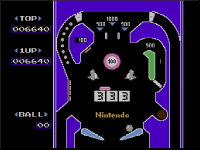
After the ball is launched, it travels across a pinball table that spans two screens. Because the field is continuous from the upper area down to the lower screen, the ball keeps moving through both halves until it either drains or is hit back by a flipper. Contact with the left or right flipper returns the ball toward the upper playfield and extends the current turn. The objective is to keep the ball from falling off the screen at any point during this two-screen traversal.
When the ball drops on the lower screen, that drain is a miss, and the remaining ball count decreases by one. The game continues as long as at least one ball remains in reserve, so play only ends once the count reaches zero after a miss. In this way the lower screen is the fail zone: a ball lost there costs one ball, and exhausting all balls triggers game over.
Holes, the Mario Sub-Table, and Special Miss Rules
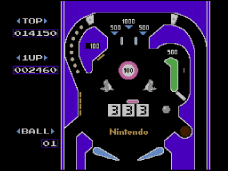
Sinking the ball into a hole moves play onto a separate special table, where the player controls Mario to strike the ball back. A hole kicker on the standard table forcefully repels the ball, and a ball that entered the special table through a hole returns to the normal table from this kicker. The standard table's display also shows the flippers, holes, the current score, the high score, and the number of balls remaining, so the hole route and ball count stay visible during play.
Dropping the ball on the special table is not a miss; the ball simply returns to the normal table instead. However, when specific conditions are satisfied, a falling lady cannot be caught, and that situation does result in a miss. So the special table usually protects the ball count, yet a failed catch under those conditions costs the ball. This separates the special table's normal drop from a genuine loss and links the lady-catching rule directly to the miss count.
On-Screen Information and Table Elements
The standard table's display shows the flippers, holes, current score, high score, and remaining ball count, so the hole route and ball count remain visible while playing. Holes on the table lead to this separate table, and play moves there when the ball enters one. On the standard table, a hole kicker forcefully repels the ball; a ball that entered the special table through a hole returns to the normal table from this kicker.
While occupying the special table, the player controls Mario to strike the ball back. Dropping the ball on the special table is not a miss; the ball simply returns to the normal table instead. However, a falling lady cannot be caught when specific conditions are satisfied, and that situation results in a miss. This separates the special table's normal drop from a genuine loss, linking the lady-catching rule directly to the miss count.
Sources & further reading.
- ピンボール — official game manual Retrieved Oct 16, 2026
First published .