 THE GAME ARCHIVE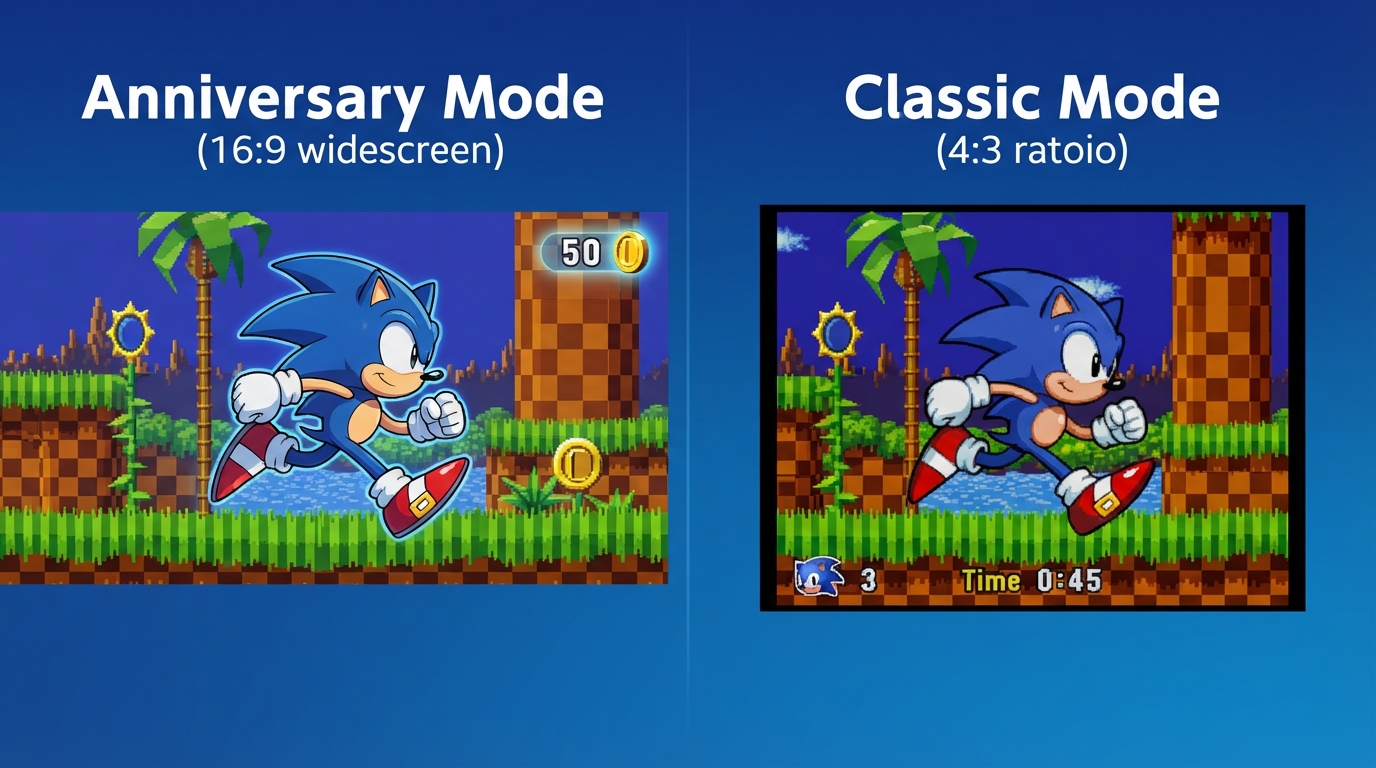
Anniversary Mode: Widescreen, Infinite Attempts, and Coin Rewards
Anniversary Mode presents the games in a 16:9 aspect ratio and allows player selection in every title, with each character having their own save data. This mode removes the Game Over and Continue states entirely—you have infinite attempts. Instead of lives, it introduces Coins. The HUD displays your Coin count in place of remaining tries. Coins are earned by clearing various conditions, including those that originally granted extra attempts as tries and Continues. You can also earn Coins by holding more than 100 Rings, by scoring above a certain number, or by fulfilling specific conditions. These Coins can be spent to unlock bonus content in the Museum.
Coins also allow you to retry Special Stages in Anniversary Mode. If you have a Coin to spare, you can attempt the Special Stage as many times as needed to obtain the Chaos Emerald or Time Stone. Special Stage gameplay varies by title; for example, Sonic The Hedgehog features a rotating maze, while Sonic CD has a 3D course with UFOs. Collecting all seven Chaos Emeralds unlocks an alternative ending. The ability to retry with Coins applies only in Anniversary Mode; otherwise, Special Stage entry and outcomes follow each original title’s rules.
Classic Mode: Original Rules with Time Limits and Tries
Classic Mode preserves the original game's rules with a 4:3 aspect ratio, pillar-boxed by default. The area left and right of the game screen can be customized in Options. Playable characters are limited to those available in the original game, and each character has their own save data. Stages have a time limit of 10 minutes game time; exceed this and you will lose a try. Tries remaining are shown bottom left, and will go down every time you take damage. Falling, drowning, or time expiration also loses tries.
If your tries drop to zero, the game will end unless you have a Continue. A Continue allows you an extra 3 tries. Additionally, tries can be regained by collecting 1UP items or by gathering 100 Rings. Rings also protect you from damage—once; if you're attacked, your Rings will scatter in all directions leaving you vulnerable. However, some hazards cannot be protected by Rings.
Coins, Museum Unlocks, and Bonus Content Progression
Coins are earned by clearing various conditions, including those that originally granted extra tries and Continues, and they can be spent to unlock bonus content in the Museum. In Anniversary Mode, you can retry a Special Stage as many times as needed to get the Chaos Emerald or Timestone, provided you have a Coin to spare. Additional Coins come from Boss Rush, where you fight bosses one after another, and from Mission Mode, where you clear selected Missions in specially designed stages.
The Museum lets you enjoy collected Sounds, Illustrations, and Movies. Each category has a Normal Collection of items automatically unlocked through gameplay and a Premium Collection of items purchased with Coins. In the Sound section, you can register up to five playlists to listen to as BGM while you enjoy the Museum experience, and icons below allow further playback customization.
Special Stages and Collectible Items
Special Stages in Sonic Origins Plus are accessed by fulfilling conditions that vary by title. In some games, entering the goal area while carrying a certain number of Rings causes a giant Ring to appear, which opens a portal to a Special Stage. Clearing a Special Stage awards a Chaos Emerald or a Time Stone. Collecting all of these gems unlocks an alternative ending. In Anniversary Mode, you can keep retrying a Special Stage until you capture the gem, provided you have Coins to spare.
Special Stage gameplay varies with each title. The original Sonic The Hedgehog uses a rotating maze, while Sonic CD presents a 3D course where you use Spin Jump to destroy all UFOs and must complete the stage within a time limit to receive a Time Stone. Within these stages, you interact with specific blocks: Bumpers bounce you off, Jump Stands are static blocks you can jump from, and Reverse and Up/Down speed controls alter your movement. Sonic CD's Special Stages also include items such as Super Rings, which earn you 10 Rings at once, and Power Sneakers, which double your speed for a limited time.
Sonic CD: Time Warp and Era-Specific Mechanics
In Sonic CD, time travel works by passing a Time Warp sign, which displays a Past or Future icon at the lower left of the screen. You must then run at full speed to travel through time; the icon also indicates your current time period. While in the past, destroying Dr. Eggman's machines removes them from the future, altering the environment. This mechanic is distinct from other titles, and the Special Stage for Sonic CD is a 3D course where you use Spin Jump to destroy all UFOs within a time limit to earn a Time Stone.
During the Sonic CD Special Stage, you navigate a 3D course and use Spin Jump to destroy every UFO before time expires, which awards a Time Stone. Item Boxes in these stages contain pickups such as Super Ring, which grants 10 Rings at once, and Power Sneakers, which double your speed for a limited time. A Time Bonus adds 30 seconds. These items appear alongside the core time travel mechanic, where past actions erase Eggman's machines from the future, and hazards like loops, collapsing walkways, and springs remain part of each Act.
Modes and Systems: Boss Rush, Blue Spheres, Mission Mode, Saving, and Pause
Boss Rush is a dedicated play mode where you fight the bosses one after another to earn Coins. Blue Spheres is exclusive to Sonic 3 & Knuckles: select "Original" for a standalone version of the secret Special Stage from that game, or select "New Mode" for a more challenging take. Press the Pause Menu button to begin play. Clear a stage level to progress to the next; enter a level code to skip ahead to a later level. Before playing, pre [truncated in evidence].
Game progress is saved automatically. To prevent loss or damage, do not turn the power off while the 'Autosave' icon is displayed. Press the Pause button during an Act to pause gameplay and display the Pause Menu. Here you can choose to continue the game, restart the Act, return to the Title Screen, or return to the Main Menu. Each title has its own unique gameplay features.
Sources & further reading.
- Sonic Origins Plus — official gameplay documentation Retrieved Oct 15, 2026
First published .