 THE GAME ARCHIVE
Basic Controls and Situational Limits
The manual's Basic Controls table on page 2 assigns each action to a specific input: Move/Aim weapon uses the Control Pad, Jump is A, Fire is B, Start/Pause/Resume game is START, and Menu navigation is SELECT. The same page adds a separate note that pressing Down makes the character lie down. Together these entries define a compact scheme in which movement and weapon aiming share the Control Pad, while jumping and firing sit on separate buttons, so the documented inputs can be performed independently of one another.
Two situational restrictions on page 2 limit how those inputs interact. First, you cannot fire while lying down in water, so the Down command and the B button cannot be combined in that setting. Second, you cannot jump or lie down while on an overhead stage, which removes both A and Down from use there. The manual states these limits directly rather than describing exceptions elsewhere, so water and overhead stages each override part of the Basic Controls list.
Starting the Game, Pausing, and Menu Navigation
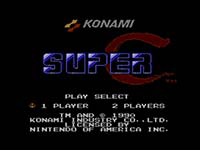
After choosing 1 PLAYER or 2 PLAYERS with SELECT, press START to begin the game. The SELECT button also serves as the menu navigation control, letting you move through options on the game's selection screens. On the title screen, holding both A and B and then pressing START opens the Sound Selection Screen, where you can listen to music and sound effects from the game. In that screen, use the directional controls to select a piece and press B to play it, A to stop it, and START to exit. The START button itself has three documented gameplay functions: it starts the game from the player-select screen, pauses the action during play, and resumes the game from a paused state. These basic controls also note that pressing down makes the character lie down, that firing is impossible while lying down in water, and that neither jumping nor lying down is possible on an overhead stage.
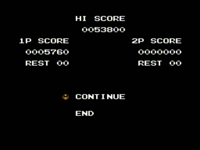
When the Game Over Screen appears, you select either CONTINUE or END with SELECT and confirm with START. Choosing CONTINUE restarts you at the beginning of the area in which you were defeated. The manual states that you can continue twice, giving two continue attempts before the option is exhausted. Selecting END returns you to the title screen. This continue rule works directly with the START button's other roles: after pausing or resuming with START during play, a defeat leads to this screen, where the same START button confirms the SELECT-highlighted option. The two-continue limit means a player who loses after already continuing twice must select END rather than CONTINUE, returning to the title screen to begin again.
Mission Goal and Losing a Life
The manual tasks the player with eliminating the merciless alien invaders, and your ultimate goal is to destroy the alien base. Along the way you are told to make the most of power-up items you discover as you blast your way through each area, taking out the alien invaders and avoiding obstacles in your way. The same page states that it is possible to play with two players simultaneously, with the instruction to team up and head into enemy territory. In a two player game, the screen will not scroll any further unless both players are present at the edge of the screen, so the documented scrolling rule ties the pair together as they advance toward the base.
For losing a life, the manual lists the exact conditions: you will lose a life if you are hit by an enemy or an enemy attack, or fall off screen. These two causes sit alongside the objective of avoiding obstacles in your way, so contact with an enemy, an enemy attack, or leaving the screen each costs one life. The same page adds that if you lose all your lives it will be game over. That statement links the life count directly to the end of the run: every hit or fall removes a life until none remain, at which point the game over message follows.
Two-Player Mode and Screen Scrolling
SUPER C supports simultaneous play with two players on the NES, and the game describes this arrangement as teaming up to head into enemy territory. The manual frames the shared objective plainly: you are tasked with eliminating the merciless alien invaders, with the ultimate goal of destroying the alien base. Each area is crossed by blasting through the invaders and avoiding obstacles in your way, and power-up items discovered along the route are meant to be made the most of. Losing a life happens when you are hit by an enemy or an enemy attack, or when you fall off screen. Lose all your lives, and it is game over.
The screen-scrolling rule changes the moment a second player joins. The official manual states that in a two player game, the screen will not scroll any further unless both players advance. The camera therefore depends on the rear player as well as the leading one: forward progress is gated by cooperative movement rather than by a single player pressing ahead alone. This documented interaction applies specifically to the two-player mode; it does not describe one-player scrolling or any host-console backup, restore, or suspend behavior. The rule sits alongside the mode description of teaming up and heading into enemy territory as a two-player arrangement.
Power-Up Capsules and Sensors
Two named objects in SUPER C behave as containers rather than hazards you must simply avoid. The manual lists a Power-Up Capsule and a Sensor, and gives each the same one-line rule: "Destroy this to reveal a power-up item." Both entries sit in the same weapon-and-item portion of the document, right after Mega Shell, which is described as destroying all on-screen enemies. The shared wording means the action is identical for either object: you shoot it, and a power-up item appears. The manual does not say which item emerges, how long the revealed item remains on screen, or whether the Capsule and Sensor differ in health, placement, or appearance. What it does document is the trigger and the result, nothing more.
The evidence places the Capsule and Sensor on the same line of play as the fireball rule that precedes them, which states that holding and releasing B fires a more powerful fireball after the standard shot hits "an enemy or wall." So the documented chain is: fire with B, destroy the Capsule or Sensor, and a power-up item is revealed. The manual never assigns the Capsule one effect and the Sensor another; both are destroy-to-reveal objects. It also never records an activation step for the revealed item, a spawn timer, or a distinction in what each drops, so the only supported interaction is destruction revealing an item.
Weapon and Item Effects
Page 7's "Power-Up Items" list begins with the Machine Gun, which "Allows you to fire a continuous stream of bullets," and the Laser, described as "A destructive armour-piercing weapon." The Barrier "Grants you temporary invincibility," with the manual noting "You will flash as long as you are invincible." Rapid Fire "Increases the fire rate for your current weapon (except the Laser)," so the Laser is explicitly excluded from that boost while every other listed weapon can receive it. Each of these effects is revealed by firing on power-up capsules or sensors.
The Spread Gun "Sprays bullets in five different directions." The Flame-Thrower "Ignites and releases multi-directional fireballs when it hits an enemy or wall," and the manual adds a charged input: "Hold and release B to fire a more powerful fireball." The Mega Shell "Destroys all on-sc" in the provided span, a truncated entry. All items sit under the same heading, "Reveal power-ups by firing on power-up capsules or sensors," so acquiring any of them depends on shooting those objects first.
Sources & further reading.
- SUPER C — official game manual Retrieved Oct 15, 2026
First published .