 THE GAME ARCHIVE
Six Golden Coins, Six Zones
The manual frames the whole game around a single collection goal: Mario advances through stages, clears them, gathers six golden coins, and heads for Mario Castle. The Golden Coins section spells out the structure behind that goal. Mario Land contains six zones, and one golden coin is hidden in each zone. Every zone holds several stages, and clearing those stages is how a coin is taken back. Once all six coins are collected, the door of Mario Castle opens.
Zone selection happens on a dedicated Mario Land map screen. On that map screen the player moves Mario and confirms the choice. Holding one button while pressing another scrolls the screen, so the map can be examined beyond its initial view. Stage play itself is described as moving Mario toward each stage goal while defeating enemies and collecting coins. The map screen is therefore where a zone is picked, while the individual stages within that zone are cleared to recover its golden coin.
Controls on the Ground
On the ground, Mario walks with the D-pad, and dashing is performed by pressing the B button while using the D-pad. Crouching is done by pressing Down on the D-pad. While crouching, a pipe at Mario’s feet can be entered by pressing Down; to enter a pipe above his head, the player presses Up on the D-pad together with the A button. These actions are listed on manual page 7, which also notes that more detailed controls for powered-up Mario forms such as Super Mario and Fire Mario appear on page 11.
The manual’s control table on page 7 groups walking, dashing, crouching, and pipe entry as stage actions. Dashing requires holding B while pressing the D-pad, and crouching is a separate Down input. Pipe entry changes by pipe position: a pipe at Mario’s feet is entered by pressing Down while crouching, while a pipe above is entered with Up plus A. The same page notes that detailed controls for powered-up Mario (Super Mario, Fire Mario, etc.) are found on page 11.
Jumps and Airborne Moves
The manual on page 7 defines the basic jump as pressing the A button. A higher jump is performed by pressing the B button plus A, or by pressing A while dashing. For Super Mario and Fire Mario, a spin jump is executed with A plus down on the control pad. When Mario is in his Bunny Mario form, a continuous jump is achieved by holding down the A button. These inputs control Mario’s vertical movement during normal platforming sections.
According to page 26, obtaining a specific item transforms Mario into a powered-up Mario, granting access to various actions. While in this state, the spin jump can defeat enemies, break blocks, and collect items or coins; it is performed by pressing down during a jump. Super Mario can also break blocks by jumping from below or spinning from above, though certain blocks cannot be broken. If Mario takes a hit, he reverts to his previous form; a Fire Mario or Bunny Mario who is hit becomes Super Mario.
Underwater and Item Controls
Manual page 8 states that holding the button makes Mario descend while jumping as Bunny Mario, rise while in a Mario bubble, or surface as Aqua Mario, and that pressing the button plus the control pad lets Aqua Mario swim. The same page lists that you hold or throw items such as a turtle shell, and that you throw fireballs as Fire Mario. How these mappings interact with jumps, air moves, and ground controls is covered in other sections.
On page 21, the zone screen appears when you pick a zone on the Mario Land map screen; there, you move Mario and press the button to choose a stage. Clearing a stage unlocks the next one. Ringing a bell midway through a stage lets you restart near the bell after a miss, and ringing the bell above the goal before finishing allows a bonus game where you get items. Page 22 adds that a miss, losing one Mario, occurs when hit by an enemy or attack, falling into a hole, or running out of time; at zero Marios, a miss ends the game. Power-up Mario hit by an enemy returns to his previous state without a miss.
Saving, Resetting, and Easy Mode
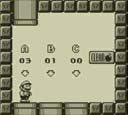
At the data selection screen, press the button to make Mario smaller, which activates Easy Mode, a lower-difficulty mode. To select a save file, use the directional controls to move Mario onto one of the three pipes labeled A through C, then press the button to confirm. The data selection screen also shows the number of cleared stages for each file. The manual notes that pressing the button at the title screen advances to this data selection screen.
The game automatically saves your progress each time you clear a stage in any zone. Up to three save files can be stored on the A, B, or C pipes chosen from the data selection screen. If you get a game over, the last stage of each zone is marked as not cleared, collected coins return to their original locations, and the counts of coins taken and enemies defeated are reset to zero before the save data is overwritten. To erase data, move Mario under the “CLEAR” text and jump. When he becomes Bomb Mario, press the button at the entrance of the pipe you want to erase. Erased data cannot be restored.
Enemies and Visual Style
Manual page 31 catalogs five enemies appearing in stages, each with a documented behavior. Pyonta is a frog that hops around and occasionally extends a long tongue to attack. Togera is a spiked larva: stepping on it causes the spikes to pierce Mario. Nokobonmet is a turtle carrying a bomb on its back that explodes after being stepped on. Chikurin sometimes rolls up its needle-covered body. Gaikotsubachi is a bee reduced to a skeleton that revives even after being stomped, so stomping does not permanently remove it. These are described as only some of the enemies appearing in stages.
The manual's page 19 omake lets players recreate the Game Boy atmosphere from the software's release era. To set the pixel count to Game Boy resolution, touch the software's icon on the HOME Menu or hold a button while starting the game; to return to the original pixel count, start the game without holding anything. While playing, press the + button simultaneously with another button to switch to a Game Boy-style screen color. The manual presents these as optional extras, separate from the six zones and Golden Coins themselves.
Sources & further reading.
- スーパーマリオランド2 6つの金貨 — official game manual Retrieved Oct 15, 2026
First published .