 THE GAME ARCHIVE
Core Controls and Basic Maneuvers
Movement begins with the basic inputs listed on page 5 of the manual: run, run faster by combining the run input with another button, crouch, and jump. A jump becomes a running jump when performed while already running, and a higher jump is possible when the character is made to crouch continuously until the character flashes, at which point the jump input produces the elevated leap. The crouch input also covers the act of squatting, and the same button is noted near vines or Hashi, meaning ladders, for going up and down.
Interaction on the stage screen is handled by a separate set of inputs from the movement group. Pulling up grass and other objects uses one button, while throwing an item combines the run input with that same button. Entering doors uses the input shown for the moment the character stands in front of a door. The manual groups these alongside the movement inputs on page 5, so the documented rules let a player run, crouch, jump, pull, throw, and enter doors using the listed button combinations.
Four Playable Characters with Distinct Abilities
At the title screen, pressing a button opens the character selection screen, where you choose which character to play. The manual states that each character has different abilities and that you can select one for each area, referring to page 9 for area details. The four selectable characters are Mario, Luigi, Toad (Koopa in the source text), and Princess Peach. Their jump abilities are explicitly ranked: Luigi has the second-highest jump power and can jump higher and farther than anyone else while descending slowly; Mario has a standard jump with no quirks; Toad has the lowest jump power; and Peach has the third-highest jump power. These rankings directly affect how you navigate each area.
Each character's movement traits change how you approach platforming. Luigi's high, slow descent lets you cover more distance in a single jump, while Toad's lower jump limits height and distance. Mario's standard jump offers no special quirks, making him a baseline choice. Peach can briefly float in midair if you hold down the jump button, as stated in the manual. Because you can pick a character for each area, you might switch to Luigi for sections requiring long leaps or to Peach for sections where a short float helps clear gaps, depending on the area's layout.
Item Types and Their Effects
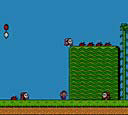
Manual page 19 groups items into three functional categories: those that act on touch, those that appear after being pulled from the ground, and those that must be held and thrown. Pulling a tuft of grass can reveal a vegetable, a key, a stopwatch, or the occasional dud that does nothing. Vegetables travel along the ground when thrown and knock down enemies they strike. A shell behaves similarly, sliding across the floor after release. Bombs detonate shortly after being picked up, destroying specific walls and defeating enemies. The magic potion is thrown to the ground, and where it lands a door appears that connects to the back side of the screen.
Manual page 20 lists items that are acquired rather than thrown. Coins picked up during an area are counted, and after clearing that area the player can play a slot machine for bonus coins. A 1UP item adds one to the player's remaining count. The stopwatch halts enemy movement for a fixed time when pulled from the grass. The mushroom power block can serve as a step or be lifted and thrown at enemies. Throwing the POW block shakes the ground, defeating enemies standing on it within the screen. Keys open locked doors.
Progression Through Worlds and Areas
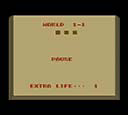
Super Mario USA is organized into seven worlds with twenty areas in total. Movement between areas is not free: gate-locked doors stand in the way, and opening them requires crystal items that the player collects. The structure therefore alternates between traversing an area's interior and resolving its exit condition, since a gate door will not yield without the relevant crystal in hand. The pause screen can be used to confirm the current world and area, which lets the player track where they stand within the seven-world, twenty-area layout without guessing from memory.
Clearing the game means working through all twenty areas spread across the seven worlds, and each world concludes with a boss that must be defeated at its end. That gives every world a fixed terminal encounter rather than an open-ended exit, so progress depends on both the crystal-gated doors inside each world and the boss fight that closes it. The life gauge matters throughout this push: taking damage reduces the memory segments until only one remains, at which point the character's body becomes small, adding a persistent risk as the player advances toward each world-ending boss.
Lives, Damage, and Game Over
The manual's page 18 damage and miss rules tie the life gauge to your stock of players. Touching an enemy from the side or below, or contacting spikes, removes one memory segment from the life gauge. When every segment of the gauge is gone, or you fall into a hole, that counts as a miss: the remaining player count drops by one and play restarts from a specific point. Each new game begins with three lives, so the gauge and the counter are separate resources that must both be watched as you move through the seven worlds.
When the remaining player count reaches zero and you then miss, the game is over and a menu appears. One option, CONTINUE, restarts from the first area of the world you were playing; the number shown on the CONTINUE screen is how many times you may retry, up to a maximum of two. The other option, RETRY, returns to the title screen. Note that the manual's page 15 note about backup and reset applies when the whole backup function is disabled, which is a separate host-console matter from these in-game continue attempts.
Combat Tactics and Enemy Encounters
Enemies can be defeated by throwing pulled vegetables, using items, or riding them, according to the manual. The manual explains that you can stand on top of an enemy and press a button to lift it while riding. Some enemies cannot be ridden on. The manual also describes that pulling grass yields vegetables, which are throwable items. After pulling a lot of grass, a stopwatch can be pulled up. Among the items, there are also vegetables that have no effect when pulled. Throwing a shell causes it to slide along the ground and defeat enemies it hits. Bombs, when held for a while, flash and explode, breaking specific walls or defeating enemies. These different methods allow players to deal with enemies in various ways.
Pulling grass not only yields vegetables but also special items like stopwatches after many pulls, as detailed on page 19 of the manual. The manual states that pulling a lot of grass allows you to pull up a stopwatch. Additionally, the magic potion, when thrown and hitting the ground, creates a door that leads to the back screen. This reveals a hidden screen with an alternate path. The manual notes that the type of vegetable that grows differs by world, but the effect is the same. These mechanics provide players with tools to uncover secrets and navigate through levels.
Sources & further reading.
- スーパーマリオUSA — official game manual Retrieved Oct 16, 2026
First published .