 THE GAME ARCHIVE
Basic Controls: From D-Pad to Special Attack
Movement in Alien Storm runs through the directional keys, which shift the character in every direction, while the Start button handles both beginning a game and pausing one. The default keyboard layout separates the action buttons across the left side of the board: A, S, D and Q, W, E stand in for the pad's A, B, C and X, Y, Z buttons respectively, with Enter covering Start. The manual also permits two players to assign game controller mappings, pressing pad buttons in the order A, B, C, X, Y, Z, Start and Mode.
The energy gauge directly governs what the character can do. When it empties, the weapon stops functioning, and low energy also blocks special attacks from being performed at all. Special attacks are mapped to the A button, so a player who drains the gauge loses both ordinary weapon output and that attack option until energy is restored. Because the gauge appears in the player stats display, the state of the meter is visible between fights rather than hidden.
Running, Jumping Attacks and the Six-Button Setup
Running and the higher jump both begin with the same double tap: pressing the direction button twice in the same direction, left or right. From that run, adding an attack produces a running attack, and adding a jump instead produces a high jump. To combine them, the player taps the direction twice, jumps, and then attacks to launch the jumping attack. A separate, simpler jump attack needs no run at all; the player jumps and then presses attack. These inputs build on the base moves: the attack button strikes, the roll/jump button jumps, and the special attack sits on its own button.
The energy gauge ties directly into these advanced options. When the gauge empties, the character's weapon stops working, and low energy also prevents special attacks from being performed. Since that special attack occupies its own button, a drained gauge removes both the ordinary weapon output and that attack option. Energy is shown in the player stats display, so its state is visible rather than hidden. The manual gives each fighter distinct techniques beyond the listed attacks: Gordon fires the Thunder Bazooka and summons the Gunship, Karla fires the Fire Blaster and calls a Ballistic Missile, and Slammer wields an Electric Whip and uses Self-Destruct without harming himself.
Arcade, Duel and 1P vs. 2P Modes
From the title screen, pressing Start opens a menu of modes. Arcade sends one or two players through eight missions against mutants; pressing Start begins, and the 1P or 2P options set up a solo or two-player game when a second controller is attached. In Arcade, both players must select different characters. If credits remain during a single-player game, a second player can join by pressing Start. Across all modes, players pick from the three Alien Busters, each with distinct techniques and specialties.
The Duel is a single-player mode fought across nine separate battles, and it becomes accessible only when Player 2's controller is disabled. The 1P vs. 2P mode instead pits two players against each other directly, with the winner of two out of three battles taking the game. Both fighting modes sit alongside the cooperative Arcade route, while the remaining title screen entries handle settings, sound test and demo playback rather than combat.
Energy, Items and the Nine-Second Continue
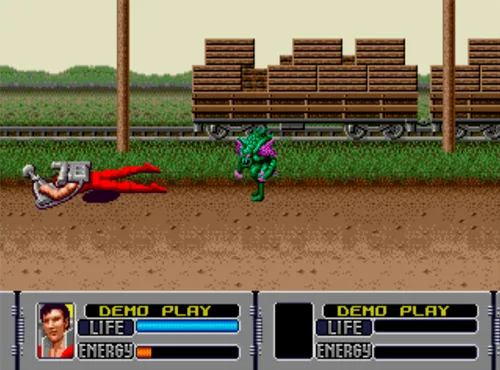
In Arcade mode, items appear when you break objects or destroy aliens, and you collect them simply by walking into them. The Energy Unit refills the energy gauge, while the Life Kit adds an extra life. That makes the gauge worth managing: an empty energy meter stops the character's weapon from working, and low energy also prevents special attacks from being performed, so picking up an Energy Unit restores the ability to fire the weapon and to use those special moves.
The life gauge governs survival. When it empties, the character dies; if no lives remain and the credit count has reached zero, the game is over. At that point a Continue message appears and counts down from nine, and you must press Start during that window to keep playing. The player stats display shows the credit number, the life gauge and the energy gauge, so the resources that decide whether a Continue can even be offered are visible on screen.
The Alien Busters: Gordon, Karla and Slammer
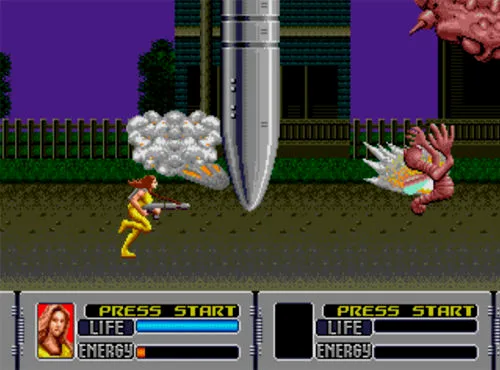
The three Alien Busters differ not just in appearance but in the arsenal each brings into a mission. Gordon fires the Thunder Bazooka and can summon the Gunship, which blasts aliens to pieces. Karla shoots the Fire Blaster and calls down a Ballistic Missile. Slammer wields the Electric Whip and uses a Self-Destruct technique; where such a move would normally harm its user, Slammer comes through intact every time. Beyond the attacks listed for each fighter, the threesome are described as skilled in other techniques, giving every character a distinct specialty to work with.
The manual's alien-busting tips treat energy as something to ration rather than spend freely. Players are warned not to burn all their energy at the start of the game, since more will be needed later as the battle heats up; energy is regained by picking up Energy Units. A second tip urges learning how different enemies act and attack so they can be annihilated more quickly. A third addresses getting lost aboard the spaceship: returning to areas already cleared points the player in the right direction, so wandering back is a legitimate way to relocate the route.
Shooting Range, HUD Readings and Options
In Arcade mode, a 3D shooting range sequence places the player on a firing line rather than in the brawling view. The crosshair is shifted with the directional button, and the Attack button fires. The targets are not all fair game: hitting innocent bystanders costs some of the player's life, so aim has a direct cost attached to a missed or careless shot. The screen also carries a separate target marker for each player, with Player 1's Target and Player 2's Target shown as distinct indicators, keeping the two shooters' aim points apart during the sequence.
The options screen groups the settings that shape a run before it starts. Game Difficulty offers Easy, Normal or Hard, while Energy Level separately sets the amount of energy the character begins with: Easy grants a lot, Normal an average amount, and Hard a minimal amount. This starting energy feeds the same gauge shown in the player stats, alongside Credit and Life, so a low setting leaves less room for weapon fire and special attacks until Energy Units are collected. The player stats display covers both players, with Player 1's stats and Player 2's stats presented separately.
Sources & further reading.
- Alien Storm — official game profile Retrieved Oct 16, 2026
- Alien Storm — official game profile — publisher-supplied gameplay manual Retrieved Oct 18, 2026
First published .