 THE GAME ARCHIVE
Basic Controls and Movement
Movement and jumping are mapped to two separate inputs. The left and right directions on the controller move the character, while the jump input performs the action of the same name. Independent inputs handle the remaining functions: one resets the current answers, another serves as pause and confirm, and a further input returns to the title screen or selects items in menus. The Home button menu is also available on the controller. These documented mappings apply to the basic controls regardless of which supported controller is registered with the console.
The game accepts the Wii U GamePad, the Wii Remote, the Classic Controller, and combinations of these devices. Two controllers are required when two-player play is chosen through the CALCULATE A or CALCULATE B selections. Only one Wii U GamePad can be connected at a time. A Wii Remote Plus can stand in for a Wii Remote, and a Classic Controller can stand in for a Classic Controller Pro. To register a controller, players open the Home button menu, choose the controller settings option, and then follow the registration prompts on screen.
Number and Operator Collection
In the Calculate mode, you guide Junior to collect numbers and operators (addition, subtraction, multiplication, division) in order to build equations. The goal is to match the number shown by Donkey Kong, which represents the answer. You must collect a digit first, then an operator; this sequence triggers automatic calculation. After that, you continue collecting digits and operators, using the current result as the starting value, until you reach the target number. The game prevents you from collecting two digits in a row, so you must alternate between digits and operators.
When you perform division, any remainder is discarded, so only the whole number part is kept. If a calculation produces a result of five or more digits, only the last four digits are considered valid. For example, if you calculate 10,000, the game would treat it as 0 because only the last four digits (0000) are used. These rules apply during the equation-building process, and you can reset your answer by pressing a button, except in Calculate B mode where the initial number cannot be reset.
Resetting Answers and Error Handling
In Donkey Kong Jr. no Sansū Asobi, the CALCULATE mode has a specific reset function for incorrect answers. According to the game manual, players can press a designated button to reset the answer after a mistake. However, this ability does not apply to the starting number in CALCULATE B, which cannot be reset once given. The game's rules also prohibit taking two numbers in a row; players must alternate between numbers and operators. When division does not result in a whole number, the remainder is discarded. Additionally, if the answer reaches five digits or more, only the last four digits are considered valid.
The reset mechanism in CALCULATE mode provides a way to correct errors without restarting the entire game. After an incorrect answer, pressing the reset button clears the current answer, allowing the player to try again. This function is especially useful in CALCULATE A, where the initial number can be reset, but in CALCULATE B, the starting number is fixed and cannot be changed. The manual also notes that division rounds down, and answers with five or more digits are truncated to the last four digits. These rules ensure consistent gameplay and error recovery within the documented parameters.
Competitive CALCULATE Mode
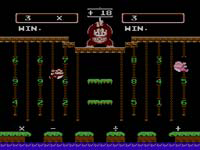
In CALCULATE, the screen always shows both the first-player and second-player Junior characters, so a second player can join or leave freely at any moment. The character that is not being operated simply does not move. The mode can be played by one or two players, and difficulty rises from the A setting to the B setting. The play area lists the calculation formula, the collected numbers, the calculation result, and the target number that the player must reach. Securing the answer happens through the player's own Juniors only.
Win counts for both competitors are tracked and displayed on the calculation game screen, and the match ends as soon as one side reaches five victories. That winner then returns to the title screen. The first-player Junior and second-player Junior are laid out separately, matching the two win tallies, so each participant can see who is ahead during the contest. The CALCULATE mode is explicitly built for two-person competition, while the exercise option covers addition, subtraction, multiplication, and division practice for a single player.
Practice Mode and Problem Solving
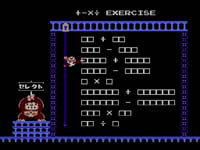
The practice mode, called Addition, Subtraction, Multiplication, and Division Exercise, is a single-player problem-solving activity. From a select screen, you move Junior to choose among addition, subtraction, multiplication, and division. Cling to the chains and use up and down to move beside the desired problem, then press right to start calculation practice. In each problem, blank squares appear in an equation at the upper right. One square is highlighted, marking the next digit to fill. You move to the chain directly below it and jump to attach.
In practice, a game session consists of ten problems. You fill the blanks one by one to complete each equation. Use up and down to select a number, then left or right to move to a horizontal chain to confirm. If you enter a wrong number, you can reset with the designated button. When all blanks are filled, the game judges the result: Junior pumps his fist for a correct answer. A perfect problem, solved without any mistakes, shows an egg mark on the right. If you are stuck, push the control to the topmost position to display the correct answer and advance to the next problem.
Controller Options and Customization
The manual lists the controllers that can be registered to the console for this Famicom title: the Wii U GamePad, the Wii U Pro Controller, the Wii Remote, and the Wii Remote paired with a Classic Controller Pro. A Wii Remote Plus may stand in for the Wii Remote, and a standard Classic Controller may stand in for the Classic Controller Pro. Only one Wii U GamePad can be connected at a time. For two-player play in either CALCULATE A or CALCULATE B, two controllers are required, so each participant needs a registered device.
Registration happens through the HOME Button Menu. Selecting Controller Settings there opens a screen where the player chooses Register, then follows the on-screen instructions to finish pairing the device. A separate Controller Settings screen lists the connected controllers and shows their button assignments. Selecting a button on the left side of the screen reveals its current mapping; selecting that button and choosing Change displays the available buttons on the right, where a new button can be picked. Choosing Confirm saves the altered assignment, and these button assignment settings are saved per game.
Sources & further reading.
- ドンキーコングJR.の算数遊び — official game manual Retrieved Oct 16, 2026
First published .