 THE GAME ARCHIVE
A Shooter Built Around Boss Gates and a Limited Jet Pack
In ESWAT: City Under Siege you command a single soldier through a run of missions, fighting through enemy-held areas until a boss blocks the way. Defeating that boss is what clears the mission and opens the road to the next one. The two abilities the publisher manual emphasizes are stacked on top of that loop: a growing arsenal you switch between with Select, and a jet pack that lets you hover but only while its Burner Gauge holds out. The game ships as a SEGA Mega Drive Classics release on Steam, where the product record gives the release year as 2010.
Eight Missions, One Boss at the End of Each
The game is arranged as eight missions played in sequence. You fight enemies on the way through each area, and the mission clears only when its boss, positioned at the end of the area, is defeated. That boss kill is the trigger that advances you to the following mission, so progress depends on finishing the encounter rather than simply reaching the end of the stage. Across the campaign this produces eight boss encounters, one closing out each area before the next begins. The practical effect is that every stretch of enemy fighting is preparation for a single decisive test, and the resources you carry into that room — gauge, lives and weapon — matter more than how quickly you cleared the approach.
The objective in each mission is tied directly to its boss: defeating that mission-specific boss is the declared point of the area, and clearing the mission unlocks the next. The instructions describe the loop as connected rules rather than separate features — fight through the enemies, finish the boss, clear the mission, continue to the next of the eight. Because the mission does not end at the stage exit, a run is best read as a repeated cycle of approach, confrontation and reset, with each cleared boss marking the only real checkpoint in the campaign.
Life Gauge, Lives and Three Continue Credits
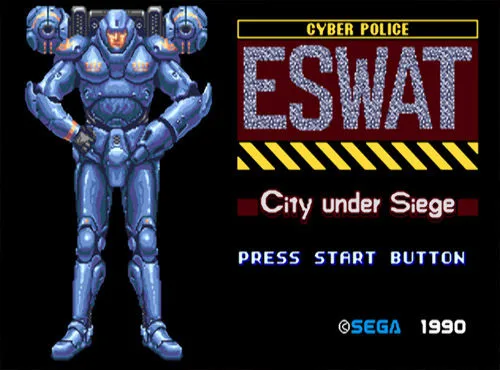
Damage is measured on the Life Gauge, shown on screen alongside the Burner Gauge, the Weapon Indicator and the count of remaining Lives. Taking a hit from an enemy attack, or simply making contact with an enemy, costs one unit of the gauge. When the gauge is completely depleted you lose a Life, and — with the basic Shot as the sole exception — the weapon you are holding at that moment is lost as well. The Weapon Indicator tracks the weapon in use, so losing it reads visibly as a switch back to the basic gun rather than a silent reset.
The Lives count works with a limited continue allowance: losing all your Lives ends the game, but you have three credits with which to continue. The Options menu includes a Player setting that determines the number of Lives, so the starting stock can be adjusted before play. In practice the rule chain runs from gauge to life — enemy hits drain gauge units, an empty gauge costs a Life and any equipped weapon beyond Shot, and running out of Lives ends the run unless a continue credit is spent. That makes the gauge the resource to protect on the approach to a boss, not just during it.
Shot, Rocket Launcher, Plasma Charge and Fire
Attacks come from the B button. Early on only the basic Shot is available, and it fires in three directions: forward, backward, and upward when you press up on the directional pad together with Attack. Pressing down on the directional pad with Attack makes the soldier kneel and shoot in whichever direction he faces. Later in the game you can find and collect weapon icons, then press Select to choose among the weapons gathered so far. The weapon in hand is tracked on the Weapon Indicator, so a switch is visible rather than silent — and so is the loss of a special weapon when the gauge empties.
The collectible weapon set includes the Shot, the Rocket Launcher, the Plasma Charge and Fire. The Rocket Launcher fires up to two rockets in succession. The Plasma Charge builds in a choice: shoot in succession for minimal damage, or charge it up to release a huge ball of plasma. Fire can be used only once, only when the Burner Gauge is full, but it causes serious damage to all enemies in the area. Because the Burner Gauge is hidden early in the game and appears only after you obtain the Jet Pack, Fire's condition becomes usable only once that gauge is on screen. These differences give each weapon a distinct role: sustained fire for crowds, burst damage for heavy targets, and Fire as a rare room-clearing option that spends a full gauge.
Jet Pack Hover and the Burner Gauge Zones
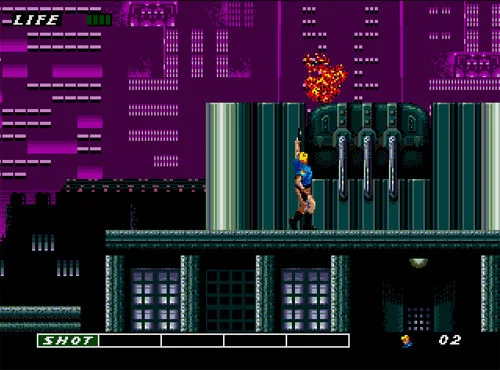
The Jet Pack arrives later in the game and is driven from the jump command: press Jump twice and hold to hover, then push the directional pad to move in any direction while airborne. Releasing Jump brings the soldier down, and tapping Jump repeatedly lets you descend slowly when precision matters. Ordinary jumping is separate: pressing up or down with Jump takes you to an upper or lower floor where the layout allows, and elsewhere pressing up with Jump produces a higher jump. Early on, Select doubles as a jump input as well. This gives the player three vertical tools — a higher jump, floor transitions and sustained hover — each suited to a different kind of obstacle.
Hovering slowly drains units from the Burner Gauge, and the gauge's color states define what the Jet Pack can still do. In the red zone you can both hover and move; in the yellow zone you can only hover and cannot move; when the gauge turns all white it is fully depleted and hovering is unavailable until it recharges. Setting the Jet Pack aside lets the gauge slowly refill, and the Burner Max pickup restores it completely. This creates a mid-air decision that the rest of the game rarely asks for: keep drifting to reach a ledge or dodge, or stop moving before the yellow zone strands you in place.
Life Up, Life Max, Burner Max and 1 UP Pickups
The pickup set covers four distinct functions rather than one generic boost. The Life Up item restores your Life Gauge by up to two units, so it can patch a partially drained gauge without necessarily filling it. The Life Max item instead completely restores the Life Gauge, making it the stronger recovery option once the meter has been worn down. Both act on the same gauge enemy hits drain, but differ in how much they return: a capped partial refill versus a full reset of the meter.
The other two pickups work on separate systems. The Burner Max item completely restores the Burner Gauge — the meter tied to Jet Pack hover and to Fire's full-gauge requirement. The 1 UP item grants one extra Life, adding to the Lives count shown alongside the gauges rather than refilling either meter. Because an empty Life Gauge costs a Life, the 1 UP works on the stock of lives themselves, while Burner Max refills the energy meter that governs hovering and the Fire condition.
Solo Play, Options Menu and Default Keyboard Mapping
This is a one-player game, with a single soldier under your command across the eight missions. Movement is handled with the directional pad, letting you walk the soldier through each area and line him up for the encounters ahead. The Start button serves double duty: it launches the game from the title screen and pauses play once you are inside a mission, so a session can be interrupted and resumed without leaving the stage.
Before play begins, the Options menu groups four settings. You can change the difficulty level, remap the button configuration, set how many Lives the player starts with, and review or adjust sound settings, then exit back to the main menu. The default keyboard mapping is unusual enough to warrant checking before the first mission: the A button is bound to the A key, B to S, C to D, X to Q, Y to W and Z to E, with Enter as Start and the D-button assigned to the directional keys. Because Select, Attack and Jump sit on the A/B/C buttons, the letter keys rather than the first letters of the actions are what actually trigger them.
Starting Guidance from the Manual
A few choices follow directly from the documented rules. Learn the Shot's three directions first, including the downward-kneel combination, because that basic weapon is the one thing you never lose when the Life Gauge empties. Treat the Life Gauge as the resource to protect on the way to each boss: contact damage drains it just as attacks do, so spacing matters even when nothing is shooting. Once weapon icons start appearing, check the Weapon Indicator after every hit that empties the gauge, since a lost special weapon drops you back to Shot. And once the Jet Pack arrives, watch the Burner Gauge color rather than the distance: stopping movement in the yellow zone beats drifting into the white zone and falling.
Scroll sideways to see the full table →
| Detail | Value |
|---|---|
| Title | ESWAT™: City Under Siege |
| Steam release year | 2010 |
| Steam platforms | Windows, macOS, Linux |
| Developer / publisher | SEGA / SEGA |
| Missions | Eight, each ending in a boss |
| Continue credits | Three |
| Player count | 1 |
Sources & further reading.
- ESWAT™: City Under Siege — official game profile Retrieved Oct 20, 2026
- ESWAT™: City Under Siege — official game profile — publisher-supplied gameplay manual Retrieved Oct 20, 2026
First published .