 THE GAME ARCHIVE
The Mission: Find Mr. Udderly, Rescue the Cows, Stop William the Kid
Spy Fox in "Dry Cereal" hands the player a single, plainly stated assignment with three interlocking parts: find Mr. Udderly, rescue all the cows, and stop William the Kid from depleting the world's supply of milk. These are the documented objectives rather than abstract goals, and they define what counts as progress in the adventure. As the super-suave agent Spy Fox, the player pursues those three ends using clever gadgets, sharp reasoning, and daring moves.
The catalogue classifies the release as Adventure and Casual, and the store description describes kids directing the journey at their own pace as they explore captivating worlds. That combination matters for how the game is read: the objective list gives the player direction, while the pace of exploration is left largely to them. The settings Spy Fox moves through supply the tools for the three tasks, so finding one figure, releasing the herd, and ending the milk theft all belong to the same operation rather than to separate modes.
Pockets and Item Use: Click It, Then Click the Target
Spy Fox keeps everything he needs inside his tuxedo, and the pockets are always reachable: moving the mouse icon close to the bottom of the screen brings up the pocket area. From there, the documented interaction is a two-click pattern. The player clicks an item to select it, then clicks the thing they want to use that item on. The manual states this applies to most of the items found around the game, so the same select-then-target action carries across environments instead of each object demanding its own control scheme.
Because the pockets are tied to cursor position rather than a dedicated button, opening them is a matter of guiding the mouse icon down to the lower edge of the screen, which keeps the inventory one quick gesture away at all times. Once an item is in hand, the second click decides where it goes, which links collected objects directly to the puzzles and characters around Spy Fox. The mouse interface handles both steps, so pocket access and item use rest on the same input method. The manual's "most items" wording leaves room for objects that behave differently, without contradicting the general rule.

The Spy Watch: Monkey Penny, a Boredom Game, Save, Load, Quit
Spy Fox's Spy Watch is the game's menu hub, and its numbered buttons carry distinct functions. One calls Monkey Penny, the contact to use when help or hints are needed. Another starts a game Spy Fox keeps with him at all times to combat boredom. A load button restores a save you have made, though nothing appears there until progress has been saved first. A save button records progress so it can be loaded whenever the player likes, and a final button closes the game and returns to the computer.
Saving through the Spy Watch opens a screen of squares: the player clicks one square, gives the save a name, and presses Enter. The documented keyboard shortcut for this is the S key. Loading, reached through its own Spy Watch button or the L key, shows the saves you have made; clicking one returns you to where you were when you last saved. If you have not saved before, the load screen offers nothing to choose, so saving necessarily comes first.
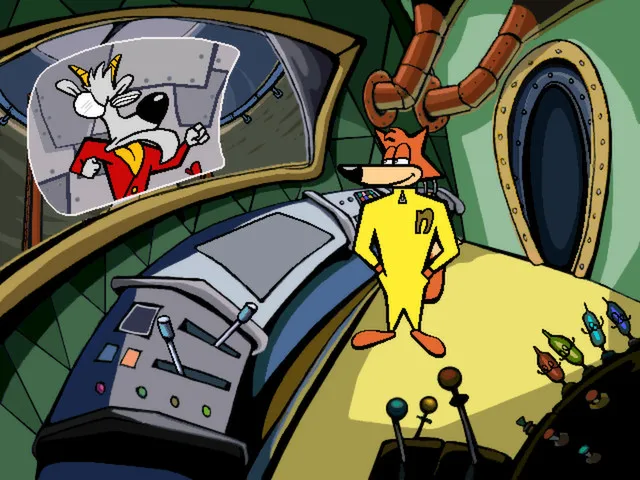
Clues, Gadgets and Talk Balloons: Puzzles That Change Each Play
Puzzle solving in Spy Fox in "Dry Cereal" runs on secret agent gadgets and logic tests. The description states that top secret Spy gadgets are used to solve puzzles that test logic, so the gadgets supply the tools for each obstacle and progress depends on applying the right device in the right place rather than on reflexes. Earned clues are a separate layer: the game says you earn clues with fun games and activities, which sets those activities apart from the gadget puzzles themselves. Clues gathered this way push the investigation forward while the logic puzzles gate the path through each setting.
The clue set is deliberately unstable between runs. The store description says clues change every time you play, and that the game just might end differently as a result. Talk Balloons are named as innovative new tools that let kids investigate in a whole new way, so they are an investigative instrument distinct from the gadgets used on puzzles. The description adds that the game challenges and inspires kids to observe details and solve problems in creative and flexible ways, which is consistent with clues that vary from one playthrough to the next rather than following a single fixed script.

ScummVM Settings: F5 Opens Audio and Subtitle Options
Pressing the F5 key at any point during play opens the ScummVM settings window, an advanced configuration layer the manual flags as the kind of thing to get an adult for. Inside that window, clicking the Options button exposes the adjustable settings: separate volume levels for music, speech, and effects, plus independent toggles for subtitles and voices. After making changes, the player clicks OK and then resume to return to the game.
The ScummVM side of the setup matters because the product runs through that engine across Windows, Mac, and Linux, and the catalogue lists all three platforms. The engine is described as released under the GNU GPL version 2. Keeping the audio and subtitle controls in a separate settings window means music, speech, and effects are balanced independently, and subtitles and voices can each be turned on or off. The supplied sources do not document which titles or additions make up the current Steam package beyond these engine notes.
Scroll sideways to see the full table →
| Field | Documented value |
|---|---|
| Title | Spy Fox in "Dry Cereal" |
| Developer | Humongous Entertainment |
| Publishers | Humongous Entertainment, Nightdive Studios |
| Genres | Adventure, Casual |
| Platforms (current product) | Windows, macOS, Linux |
| Steam product year | 2014 |
| Engine | ScummVM (GNU GPL v2) |
Sources & further reading.
- Spy Fox in "Dry Cereal" — official game profileRetrieved Oct 30, 2026
- Spy Fox in "Dry Cereal" — official game profile — publisher-supplied gameplay manualRetrieved Oct 30, 2026
First published .