 THE GAME ARCHIVE
Boot Up: Materials, Modes, and Difficulty
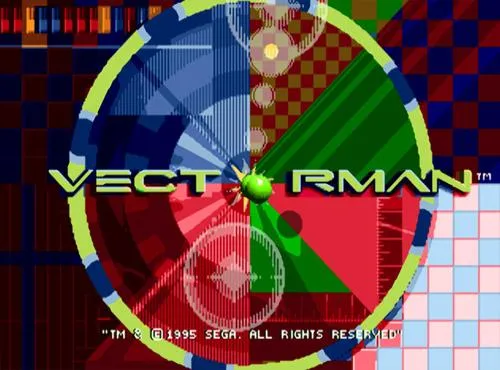
From the title screen, pressing Start opens a menu with two documented choices. Start Game begins play at Day 1, the first stage, while Options opens a settings screen for adjusting the game. Within Options, the directional pad moves up and down between entries and left and right to change a selected setting. The settings themselves cover sound effects on or off, music on or off, and difficulty. The Options screen also includes a Music Test and a Sound Test: you pick a game tune or a sound and press Jump to play it.
Difficulty is set in Options and offers three levels: Lame, Wicked, and Insane. The basic controls around these menus are straightforward. The directional pad walks VectorMan left and right and looks up and down; the Start button starts the game and pauses it during play. Both the A button and B button shoot, and the C button jumps. These mappings matter from the first stage because jumping and shooting are the actions the later mechanics build on.
Default Gun, Five Weapon Icons, and the Ammo Reset
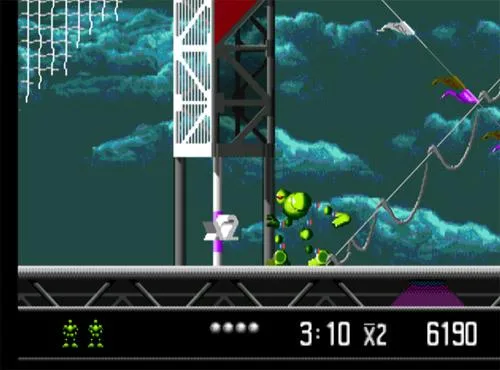
VectorMan begins every stage armed with a default gun that fires a single shot each time the player presses the A or B button. Scattered through the levels are Weapon Icons, five in total, and collecting one equips the corresponding advanced weapon. Each of these five advanced weapons has its own unique fire power, giving the player alternate ways to shoot beyond the standard single shot. The equipped weapon is shown on the game screen, so the currently active gun is visible during play alongside the lives remaining, score, timer and health points.
The advanced weapons obtained from Weapon Icons carry limited ammunition. Once a special weapon’s ammo runs out, VectorMan reverts to his standard gun, which has no such ammo limit. This creates a cycle in which the player picks up a Weapon Icon to gain a stronger or different firing mode, spends its limited ammunition, and then returns to the default single-shot gun until another icon is collected. Because the five icons each produce a distinct fire power, the choice of when to spend shots affects how long an advanced weapon lasts before the reversion to the default gun.
Jump Boosters, Rapid Fire, and Keyboard Mapping
Jumping has a second layer beyond the basic C button hop. Pressing Jump again while VectorMan is already airborne activates the jump booster, adding a midair burst to the ordinary jump. In the same advanced-controls list, holding the Attack button produces rapid fire when a weapon makes that mode available. Both actions run on top of the basic scheme: the directional pad walks left and right and looks up and down, Start begins and pauses, A and B both shoot, and C jumps. The booster therefore rewards a timed second press rather than a new button.
The PC version maps the pad and buttons onto keyboard keys. A is assigned to Q, B to S, C to D, X to A, Y to Z, Z to E, and Start to Enter, while the directional pad is handled by the directional keys. Translated into play, Q and S both fire, D jumps and triggers the booster on a second midair press, and Enter starts or pauses. The same keyboard printout also lists X, Y and Z bindings, even though the basic control list only names the directional pad, Start, A, B and C.
Seven Morph Icons and What Each Transformation Can Do
Seven Morph Icons are scattered through the stages, and picking one up transforms VectorMan for a limited time so he can carry out a special task. While transformed he is invincible, letting him move freely into areas he cannot normally reach. The Drill breaks through certain floors, the Bomb creates an explosion that destroys walls, ceilings and floors and takes out surrounding enemies, and the Buggy rolls on wheels to smash through blocking walls. The Jet flies freely through the air, the Missile penetrates ceilings to reach new zones, the Fish swims rapidly through water and can destroy enemies by charging into them, and the Parachute slows his fall.
Steering each form relies on the directional pad: left and right movement for the Drill, Bomb, Buggy and Parachute, flight direction for the Jet and Missile, and movement for the Fish through water. The Bomb adds a firing action to set off its explosion, and it also detonates when the transformation time runs out. Since every icon lasts only a limited time and grants invincibility for that span, matching the active form to the obstacle ahead decides whether a floor, ceiling, wall or stretch of water is opened before the morph ends.
Televisions, Health, and Score Multipliers
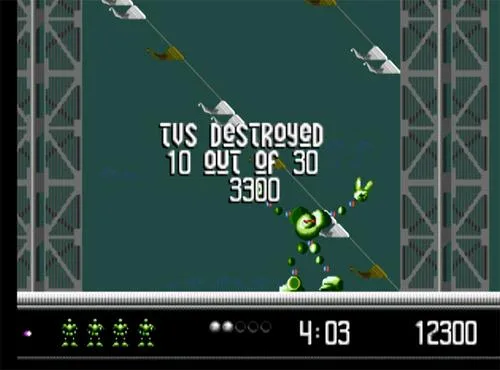
Television monitors are scattered across each stage, and destroying one yields a weapon or power-up. Other pickups sit alongside them: Photon items add points, Health Points restore one health point, Full Health refills the entire meter, Max Health raises the maximum by one, and a 1-UP grants an extra life. Each stage also carries Weapon Icons and Morph Icons. VectorMan keeps fighting the enemy leader WarHead for as long as any Health Point remains; the game ends only when every life is lost.
Multiplier items follow a different rule from ordinary pickups: they multiply scores, Health Points and 1-UPs rather than simply adding to them. Extra Time adds two minutes to the stage timer, extending the clock you are working against. Milestones let you retry a stage from specific locations instead of restarting the whole map, so reaching one gives a later fallback point. Since the timer and lives are tracked alongside score and health on the game screen, these items touch the staged run at several points at once.
Sources & further reading.
- VectorMan™ — official game profile Retrieved Oct 17, 2026
- VectorMan™ — official game profile — publisher-supplied gameplay manual Retrieved Oct 18, 2026
First published .