 THE GAME ARCHIVE
Virtua Fighter 2, as presented in SEGA's publisher-supplied manual for the SEGA Mega Drive Classics release, is a one-on-one fighting game whose rules fit on a single page but produce two very different experiences. Solo play runs an arcade ladder against computer opponents; a second person can interrupt that ladder at any moment and take over as a challenger. Both routes share one rule set: three rounds by default, two round wins to take the match, and two ways to end a round, a K.O. or a Ring Out. The manual treats the underlying controls as deliberately thin, three buttons and a direction pad, with special attacks left for the player to discover.
What makes the documented setup distinctive is how tightly the modes interconnect. Arcade Mode is not a sealed single-player campaign: it is the shared surface where a second player arrives, where the winner's progress resumes, and where a loss ends the run unless the player retries in time. The Options screen sits on top of all of it, letting the player rewrite the win conditions themselves, from damage taken per hit to whether the clock exists at all.
Two Ways In: Arcade Mode and VS Mode
From the title screen, Start opens the main menu, which splits play into separate routes. Arcade Mode is a single-player game pitting the player's fighter against CPU opponents. VS Mode is a two-player competitive game for two human fighters. Whichever route is chosen, the same fighting rules apply, so a player who learns the Arcade ladder is practicing for the head-to-head matches and the reverse.
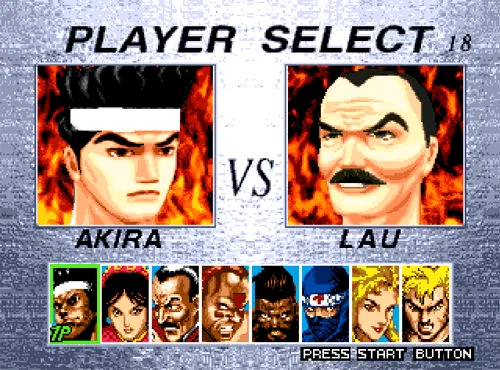
Arcade Mode also carries the manual's drop-in rule. A second player can join during an Arcade Mode game by pressing Start on a second controller. The screen announces "Challenger Comes," then the Character Select screen appears so the newcomer can pick a fighter. After the interruption resolves, the winner continues the Arcade Mode game from the beginning of the interrupted stage. This makes the arcade ladder a shared stage rather than a private one: a challenger can hijack a run, and the original player only keeps their place in the sequence by winning the head-to-head bout.
Failure in Arcade Mode is handled with a short window. If the player fails to win a match, the game ends, but pressing Start before the countdown runs out retries from the round last played. The retry restarts from the last round rather than the whole stage, so the documented cost of a loss is a partial reset with a real time pressure attached to taking it.
Three Buttons and a Direction Pad
The manual's Basic Controls are spare. The D-button moves, the Start button starts or pauses a game, the A button guards, the B button punches, and the C button kicks. Everything a fighter does in a round grows out of that small set. Guard, punch, and kick each get a dedicated input, which means the core decision at any moment is which of the three to commit to while steering with the direction pad.
On the keyboard, the default layout maps the game's named buttons to keys rather than using the button letters literally. The A button is key A, the B button is key S, and the C button is key D, so Guard, Punch, and Kick land on adjacent keys under the left hand. The X button sits on Q, the Y button on W, and the Z button on E, Start is Enter, and the D-button is handled by the directional keys. In practice, a keyboard player pressing A, S, and D is triggering Guard, Punch, and Kick respectively, not the game's X, Y, and Z inputs.
For gamepads, any Windows-compatible controller works provided it has a D-pad and at least four other assignable buttons. The game recognizes any number of attached controllers and lets each be assigned to Player 1 or Player 2. Setup runs through Options on the main menu: in the input configuration section, choose the controller from the drop-down menu for the relevant player, click the assign controller mapping button, then press the pad's buttons in the order A, B, C, X, Y, Z, Start, and Mode. Pads with fewer than eight buttons leave the later assignments unavailable.
Moving, Guarding, and the Hunt for Special Attacks
Movement runs through the D-button or directional keys. Left and right move the fighter forwards and backwards, up jumps, and down crouches. The manual then adds a layer on top: combining directions produces jumps and crouches that travel forwards or backwards. That turns the direction pad into more than a walk control, because a player deciding whether to close distance, retreat, or leave the ground is choosing among several distinct positions from the same small input set.
Special attacks are handled differently from most fighting-game manuals: there is no move list. Instead, the manual instructs the player to experiment with combinations of the D-button, Guard, Punch, and Kick to find special moves to overpower the opponent. That makes discovery part of the documented play. The same four inputs that walk, defend, punch, and kick are the raw material for the stronger attacks, so time spent testing combinations in the arcade ladder is time spent building a personal move set.
K.O., Ring Out, and Time Over
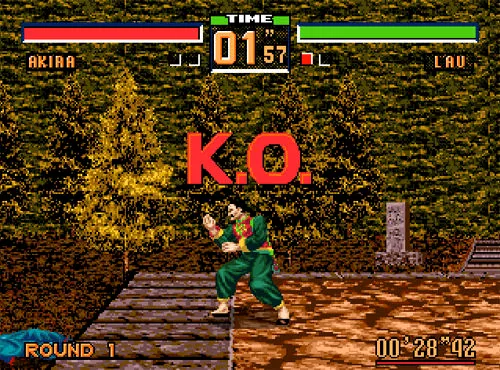
A match consists of three rounds by default, and the first player to win two rounds takes the match. A round has two documented win conditions. The first is a K.O., achieved by reducing the opponent's Life gauge to zero. The second is a Ring Out, achieved by forcing the opponent out of the ring. Because either method counts, a player can plan a round around steady damage or around pushing the opponent past the boundary, and the two routes reward different approaches.
If neither condition is met before the time Limit is reached, the manual calls the result "Time Over" and awards the round to the player with the longer Life gauge. That third outcome turns the timer into a second scoreboard: a fighter who is ahead on health can play defensively and let the clock decide, while a fighter who is behind has to force a K.O. or a Ring Out before time runs out. The game screen tracks the pieces these rules depend on: the round count for the current match, the wins recorded by each fighter, each fighter's Life gauge, the timer, and the total time.
Rewriting the Rules in Options
The Options entry on the main menu is where the match rules themselves can be altered. The D-button's up and down directions select a category and left and right change the selected value. The categories the manual details are Life Gauge, Match Point, Time Limit, Enemy Level, and Key Assign. Life Gauge sets the amount of damage taken per hit, running from Smallest to Largest, and a No Damage setting makes the fighter invincible to attack. That setting alone changes the game's character: with No Damage active, a round can no longer end by K.O., so Ring Out and the clock become the only routes to a win.
Match Point sets the number of wins needed to decide a match, replacing the default two-win requirement with whatever count the player chooses. Time Limit sets the length of each fighting round, and a No Limit option removes the clock so the round continues at the player's own pace. No Limit pairs naturally with the other rules: without a timer there is no Time Over health comparison, so rounds end only by K.O. or Ring Out, and a short clock conversely pushes rounds toward the Life gauge decision. Enemy Level sets the skill level of the CPU opponents faced in Arcade Mode, and Key Assign changes the key configuration.
Together these settings let a player tune the pace of a session. Short rounds plus a high Match Point make long, tense sets decided by health comparison. No Limit plus No Damage turns every round into a pure positioning problem where Ring Out is the only way to win a round. Low Enemy Level plus generous Life Gauge smooths the arcade ladder, while Enemy Level alone is the documented difficulty dial, since it affects CPU skill specifically.
Getting Started: What to Do First
A player new to the documented rules can start with a short checklist that follows the manual's own order. First, from the title screen, press Start to reach the main menu. Choose Arcade Mode for solo play against CPU opponents. In the round, guard with A, punch with B, and kick with C, and remember that on the default keyboard layout those actions are keys A, S, and D. Push left and right to advance or retreat, tap up to jump and down to crouch, and begin combining directions with the attack buttons to search for special moves. If a match goes badly, press Start before the Game Over countdown expires to retry from the last round.
Second, decide whether the clock should matter. If Time Over decisions feel arbitrary, set Time Limit to No Limit in Options and accept that rounds will now end only by K.O. or Ring Out. Third, if a second player is present, hand them a controller configured through Options; they can press Start mid-Arcade to become a challenger, at which point the Character Select screen appears and the winner resumes the arcade run from the interrupted stage.
Scroll sideways to see the full table →
| Option | What it changes | Documented range or effect |
|---|---|---|
| Life Gauge | Damage taken per hit | Smallest to Largest; No Damage makes the fighter invincible |
| Match Point | Wins needed to decide a match | Player-chosen win count replacing the default two |
| Time Limit | Length of each fighting round | Set length, or No Limit to remove the clock |
| Enemy Level | Skill of CPU opponents | Adjustable skill level for Arcade Mode |
| Key Assign | Key configuration | Rebinds keyboard inputs |
Sources & further reading.
- Virtua Fighter™ 2 — official game profile Retrieved Oct 20, 2026
- Virtua Fighter™ 2 — official game profile — publisher-supplied gameplay manual Retrieved Oct 20, 2026
First published .