 THE GAME ARCHIVE
The Case: Objective and Underwater Route
The case centers on Grandma Grouper's missing kelp seeds. Without them, the sea creatures will go hungry, so the goal is to recover the seeds and save the reef. Players take the role of underwater detective Freddi Fish, working alongside her finny friend Luther. Solving the case means gathering information while exploring and then using what has been learned to work through the sea's mysteries. The hunt for the missing seeds unfolds across 40 different places, and Freddi's ocean-bed exploration can turn up unexpected finds.
That search is set in an underwater world of caves, deep canyons and colorful reefs. Among the stops are King Crab's Castle and A Sunken Ship Out of Time, both named as locations in the effort to save the reef. This is a single-player adventure, and the emphasis on exploring the ocean bed with Freddi produces the discoveries that keep the route moving. Players gather information in these settings and then apply it to solve the mysteries of the sea, with the missing seeds as the thread tying the locations together.
Click-to-Move Controls and Carrying Items
Navigation in Freddi Fish and the Case of the Missing Kelp Seeds is handled through on-screen arrows rather than a free-roaming character. Clicking an arrow sends Freddi in the direction it indicates, so each screen is traversed by choosing among the visible directions. The manual's instruction to explore everywhere fits this arrangement: the ocean-bed settings and named stops such as King Crab's Castle are reached by clicking through the arrow paths that appear on each screen, and the arrows shown define where Freddi can go next.
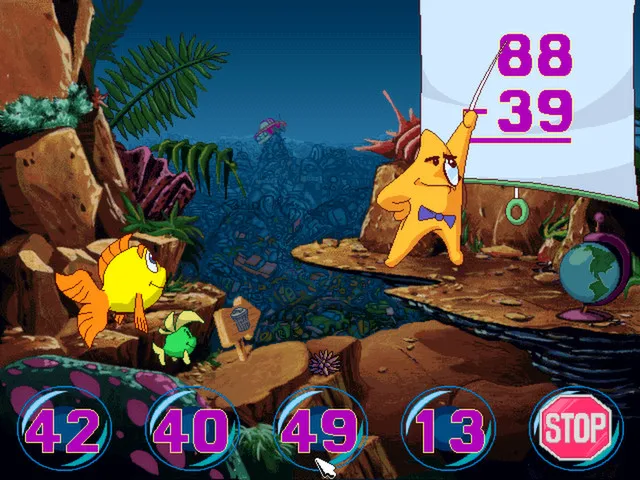
Items Freddi picks up are displayed inside bubbles along the bottom of the screen, giving a running view of what she is carrying. To use an item, the player clicks it and then clicks the object it should be applied to. Most found items work this way, so the carrying display and the two-click use rule are linked: the bubbles are where an item is selected, and the second click directs it at a target in the scene. Solved exchanges depend on matching the right carried item to the right object.
Secret Click Points and Surprises
Beyond the named destinations, the ocean bed itself is dotted with hidden interactables. The official feature list describes more than 500 secret click points, and each one delivers a new surprise whenever the game is replayed. Because these surprises are described as fresh on every playthrough, the click points are not simply a fixed set of static hotspots that always yield the same result. Exploring the caves, the deep canyons and the colorful reefs is where these finds surface, so moving through screens with the directional arrows doubles as a way to stumble onto them.
The secret click points sit inside the same locations the case passes through, including King Crab's Castle and A Sunken Ship Out of Time, so the discoveries are woven into the route rather than kept on a separate screen. In practice, the travel arrows carry Freddi across 40 different places, and the extra click points reward players who probe the scenery rather than only clicking onward. The surprise-every-time design means repeat visits can turn up different results, which pairs naturally with the carrying bubbles: an uncovered item can be selected and then clicked onto a scene object to see the exchange.

Save, Load and Quit Keys
Saving is handled from the keyboard: pressing the S key opens the Save Game screen. That screen presents a grid of squares, and the player clicks one of them, types a name for the save, and presses Enter to record the game. The squares act as individual save slots rather than a single rolling checkpoint, since each one is named separately. Nothing else in the documented flow is required to finish saving, so the process amounts to opening the screen, choosing a slot, labeling it and confirming.
To resume, pressing the L key brings up the Load Game screen, where clicking a named save returns the player to the point where that save was made. The rule is strict about order: if nothing has been saved, the load screen offers nothing to select, so saving must precede loading. Quitting uses the F5 key, which brings up a screen with a Quit option at the bottom; pressing that returns to the computer desktop. On a Macintosh, the manual gives a different key for the same purpose.
Audio Options: Volume, Voices and Subtitles
Audio settings in Freddi Fish and the Case of the Missing Kelp Seeds are reached through the function key that opens the ScummVM settings window. From there, choosing the Options button exposes separate volume levels for music, speech and effects, so each of the three can be balanced independently rather than through a single master slider. Adjustments take effect after clicking OK and resuming, which returns the player to the game already in progress. The manual frames this panel as an advanced area, advising that a parent or guardian handle the configuration.
The same Options panel carries switches for subtitles and voices, each toggled on or off rather than set to a level. Because the voice toggle sits beside the speech volume control, spoken dialogue and its written text can be managed as separate concerns: volume changes how loud speech plays, while the switches decide whether voices and subtitles appear at all. A further route through the launcher reaches graphics and rendering modes, MIDI settings and directory settings; the manual warns that misconfiguring these can prevent the game from loading correctly.
Sources & further reading.
- Freddi Fish and the Case of the Missing Kelp Seeds — official game profileRetrieved Oct 30, 2026
- Freddi Fish and the Case of the Missing Kelp Seeds — official game profile — publisher-supplied gameplay manualRetrieved Oct 30, 2026
First published .