 THE GAME ARCHIVE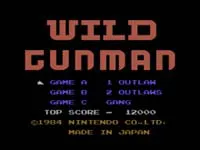
Wild Gunman on Famicom: GAME C, Lives, and Light Gun Controls
In Wild Gunman on the Famicom, GAME C shifts from the quick-draw duels of GAME A and B to a wave-based shooting challenge. Outlaws appear one after another from doors and windows, and the goal is to eliminate ten of them to advance to the next stage. This mode tests your reaction time and aim as you track multiple targets emerging from different openings. Unlike the earlier modes, where you must wait for the signal to fire, GAME C requires you to shoot each outlaw as they appear, with no verbal cue. The setting remains the American Wild West, but the focus is on clearing a set number of bandits rather than outshooting a single opponent.
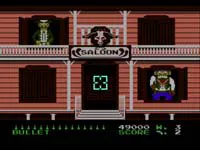
Each stage in GAME C gives you a limited supply of fifteen bullets, displayed in the lower-left corner of the screen. You must make every shot count, as running out of ammunition likely leaves you unable to stop the outlaws. When you are hit, you lose one of your five remaining lives, and the game ends after three defeats. This creates a balance between speed and accuracy: firing too hastily may waste bullets, while hesitating allows the outlaws to get the drop on you. The bullet count and life total are visible at all times, keeping you aware of your resources as you progress through each wave of ten outlaws.
Loading the Light Gun: Wii Remote Registration and Sensor Bar Setup
On Wii U hardware, a Wii Remote is registered and then used as the light gun, and a Wii Remote Plus can serve in its place. Registration happens through the HOME button menu by choosing controller settings and then registration, after which the on-screen instructions are followed. The software requires a sensor bar, and the setup details are given in the Wii U instruction booklet; the Wii U GamePad's sensor bar can substitute. When the software starts, a prompt appears asking you to press the button on the Wii Remote you intend to use as the light gun. Non-light-gun play can use the Wii U GamePad or Wii U PRO Controller.
Pointing the Wii Remote designated as the light gun at the screen makes an aiming cursor appear. The light-gun Wii Remote is automatically fixed to the vertical holding setting, and button assignments cannot be changed. The registerable controls include shooting, game start and pause, game select, toggling the aiming cursor display on and off, the VC menu, and the HOME button menu. A Wii Remote Plus may replace the Wii Remote for this role.
Five Lives, Three Defeats: Running Out of Chances
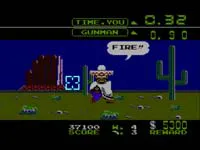
In GAME C, a single mistake carries two separate counters. Being shot counts as one defeat, and the player's remaining total of five drops by one. The mode does not end at the first hit; it continues until three defeats have accumulated. So a player can absorb two hits and keep clearing waves, but the third ends the run. Meanwhile, each stage supplies fifteen bullets, shown in the lower-left corner of the screen. Because ten outlaws must be eliminated to advance, the margin allows five misses per stage before ammunition runs short.
The two limits pull in opposite directions. Spending bullets faster than outlaws appear risks reaching zero while targets remain; hesitating too long lets an outlaw land the shot that removes a life. Ten outlaws per wave against fifteen bullets means careful aim stretches the supply, while five lives against a three-defeat end means early hits are survivable. Both figures stay visible during play: lives as a running total that only falls, and ammunition as a per-stage count reset when the next wave begins. The player tracks both while firing at doors and windows.
Fifteen Bullets per Wave: Ammo Limits and Scoring Bounties
In GAME C of Wild Gunman on the Famicom, each stage provides a fixed supply of fifteen bullets, displayed in the lower-left corner of the screen. This ammunition limit interacts with the objective of eliminating ten outlaws per wave, allowing only five missed shots before the supply runs out. The bullet count resets at the start of each new wave. If the player runs out of ammunition while outlaws remain, they cannot clear the stage, so careful aiming is necessary to stretch the supply across the ten required eliminations.
Scoring in GAME C reflects the bounty system inherited from the earlier modes. Each outlaw carries a displayed dollar bounty above them, and eliminating an outlaw adds that bounty amount to the player's total score. A speed bonus also applies: the faster the shot, the larger the bonus added. The total score is shown on screen alongside the remaining bullet count, wave number, and lives. These scoring rules reward both accuracy and quick reactions, since every outlaw defeated contributes its bounty plus any speed bonus to the running total.
B Button Starts, C Button Selects: Menu Controls Before the Draw
Before any duel begins, Wild Gunman's opening actions are split between selecting a mode and starting play. The C button chooses among the three games offered, and the B button starts the chosen one. The manual describes the same result through the light gun itself: pointing away from the game screen lets you pick a game, while pointing at the game screen begins play. So with GAME A, GAME B, or GAME C already highlighted, pressing B commits you to that mode, and the shooting can begin.
When the designated Wii Remote is registered as the light gun and aimed at the screen, an aiming cursor appears at the point of aim. That remote is fixed to the vertical holding setting, and its button assignments cannot be altered. The listed registerable controls cover shooting, game start and pause, game select, toggling the aiming cursor display on or off, the virtual console menu, and the HOME button menu. Because pointing away from the game screen also selects a game, the cursor serves both as aim indicator and as the visual guide for menu navigation.
Pausing and Saving: HOME Menu Options During Play
During play, touching the Wii U GamePad screen brings up the virtual console menu, and while that menu is displayed the game is suspended. From the Wii Remote that serves as the light gun, the same menu appears by pressing a button during play, and the menu can be operated from whichever controller opened it. The menu itself holds saving, restoring, resetting, and controller settings. Saving backs up the game's progress by copying and storing it; restoring reads back data that was backed up this way, and that option appears only when such data exists. Resetting returns to the title screen.
Controller settings in the menu let you check and change controller configuration and button assignments. The Wii Remote used as the light gun is a separate case: it is fixed to the light-gun-specific setup, so its settings cannot be changed. That remote is fixed to the vertical holding setting, and its assignments cannot be altered. Registration itself happens through the HOME button menu by selecting controller settings and then registration, then following the on-screen instructions. The light gun must be a Wii Remote registered to the console, and a Wii Remote Plus can serve in its place.
Sources & further reading.
- ワイルドガンマン — official game manual Retrieved Oct 16, 2026
First published .